 NEWS
NEWS
Apple Pulls 'Rewound' App That Turned iPhone Into a Classic iPod
 12/17/2019
 2733
2733
Last week, a music player app called "Rewound" surfaced on the App Store, with the purpose of bringing back classic music players through downloadable skins, including the iPod with its classic click wheel design.
Lots of people loved the iPod design for the nostalgia, but Apple wasn't a fan and has pulled the app from the App Store. 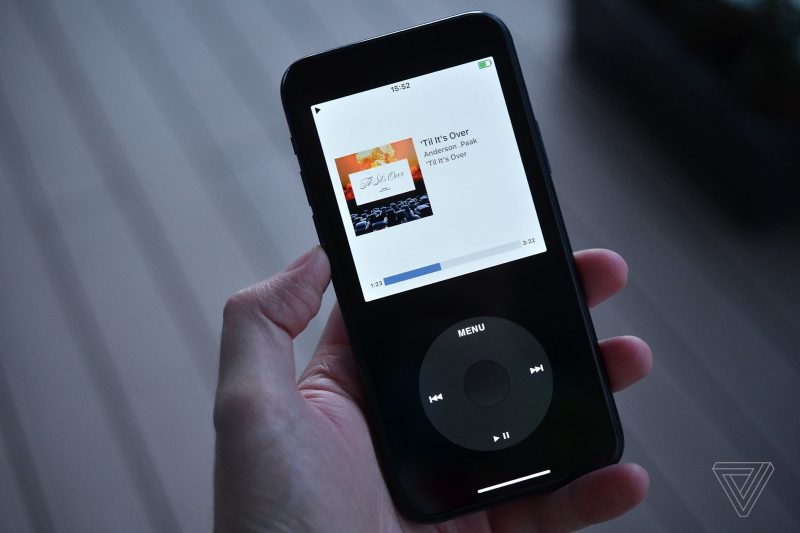
In an article on Medium, Rewound's creators explain that Apple "killed" the app because it copied the iPod's design, charged a fee for Apple Music features, and, apparently, could be mistaken for an Apple-designed app.
Rewound disputes all of these charges, insisting that Apple was "salty" that users shared clickwheel skins (the app could be customized with multiple looks, though initial focus was on the iPod). From the Medium post:
- An optional scrolling motion to navigate a menu isn't Apple IP
- A button layout without a wheel or scrolling navigation isn't Apple IP
- Similar menu systems are found in all operating systems.
- Skins were user added/downloaded, we didn't include them in the app.
Rewound's developer says that the app can't be updated to get it re-approved without breaking the app for the 170,000 people who use it at the current time. A separate version is in the works, but the developer feels that it is "barely worth the time or effort to even try and humor them" as the developer believes Apple will continue to deny the app.
The developer plans to make a Rewound web app as an alternative that can be used on the iPhone "without Apple's approval," and is seeking $50,000 in funding for the project.
Source: Macrumors









