NEWS

Apple’s 16-inch MacBook Pro has a Mysterious new ‘lid Angle Sensor’

11/20/2019

2454

Apple’s 16-inch MacBook Pro has a Mysterious new ‘lid Angle Sensor’


Apple’s new 16-inch MacBook Pro not only has a bigger screen, but it returns to a scissor switch keyboard, has louder speakers, a better mic, and a... lid angle sensor?


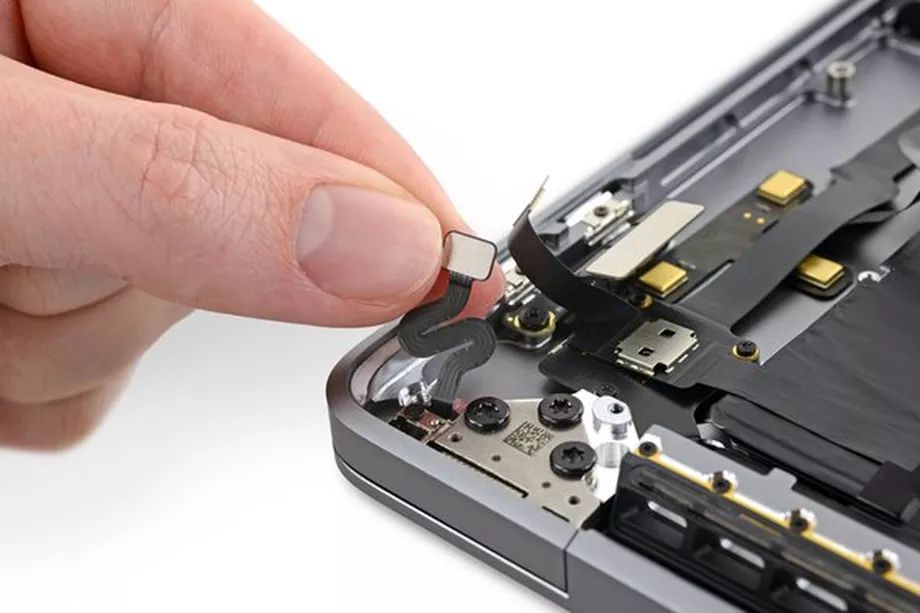
MacRumors found the mention of the new sensor in a service document that was sent to Apple Authorized Service Providers. It shared the info with iFixit, which found the small sensor inside the computer and also noticed that the MacBook Pro’s hinge has a magnet inside it with an arrow that indicates the hinge’s polarity.


But that’s as much as we concretely know about the lid angle sensor. Based entirely on the name, it seems likely that the sensor can track the exact angle of the lid in some way. iFixit also speculated that the sensor helps keep a history of how much the display has been adjusted, perhaps to help Apple diagnose any potential “Flexgate”-like backlight issues that could appear on the laptops in the future.


Without more information from Apple, it’s hard to know exactly what the sensor might be for. MacRumors did see in the service document that both the computer’s display and lid angle sensor need to be calibrated before a repair is considered to be complete, so Apple seems to want to make sure the sensor is handled properly.


Source: The Verge

Windows
Mac OS
iOS
Linux
3uTools
Win 64-bit For this device
V9.0 2025-11-11
Download
Win 32-bit For this device
V9.0 2025-11-11
Download
3uTools
Intel Chip How to Identify Chip Type
V9.0 2025-12-02
Download
Apple Chip
V9.0 2025-12-02
Download
How to Identify Chip Type
1.  Click the Apple icon in the top-left corner of the screen and select About This Mac.
2.  Check the Processor or Chip field to determine if it is "Intel" or "Apple".
Please use the 3uTools PC client to install the iOS client:
1、 Install either the Windows or Mac version of 3uTools on your computer
2、 Open the PC client and connect your device to the computer via USB cable
3、 After the connection is successful, wait for the computer to automatically install the mobile app for the device, or locate “Install Mobile App” on the computer and manually click to install.
3uTools
deb file
V3.01 2025-11-20
Download
rpm file
V3.01 2025-11-20
Download
Windows
Windows
iOS
iOS
Android
Android
TV
TV
3uAirPlayer
Win 64-bit For this device
V6.0.2 2025-11-19
Download
Win 32-bit For this device
V6.0.2 2025-11-19
Download
iOS Device Mirroring (No App Required)
1、 Install 3uAirPlayer on the Windows PC
2、 Open Control Center and select Screen Mirroring
3、 From the list, choose your PC to start mirroring
4、 Or connect your iOS device to the PC via USB to begin mirroring
Scan to get "3uAirPlayer" App
3uAirPlayer TV V1.0.18
2025-11-28
TV System Requirements: Android 7.0 or later
Download the TV installation package, copy it to a USB drive, insert it into your TV or set-top box, then select the file from the home screen to install.