NEWS

Exclusive: Screenshots Reveal iOS 13 Dark Mode, New Reminders app, More

05/29/2019

3411

Exclusive: Screenshots Reveal iOS 13 Dark Mode, New Reminders app, More


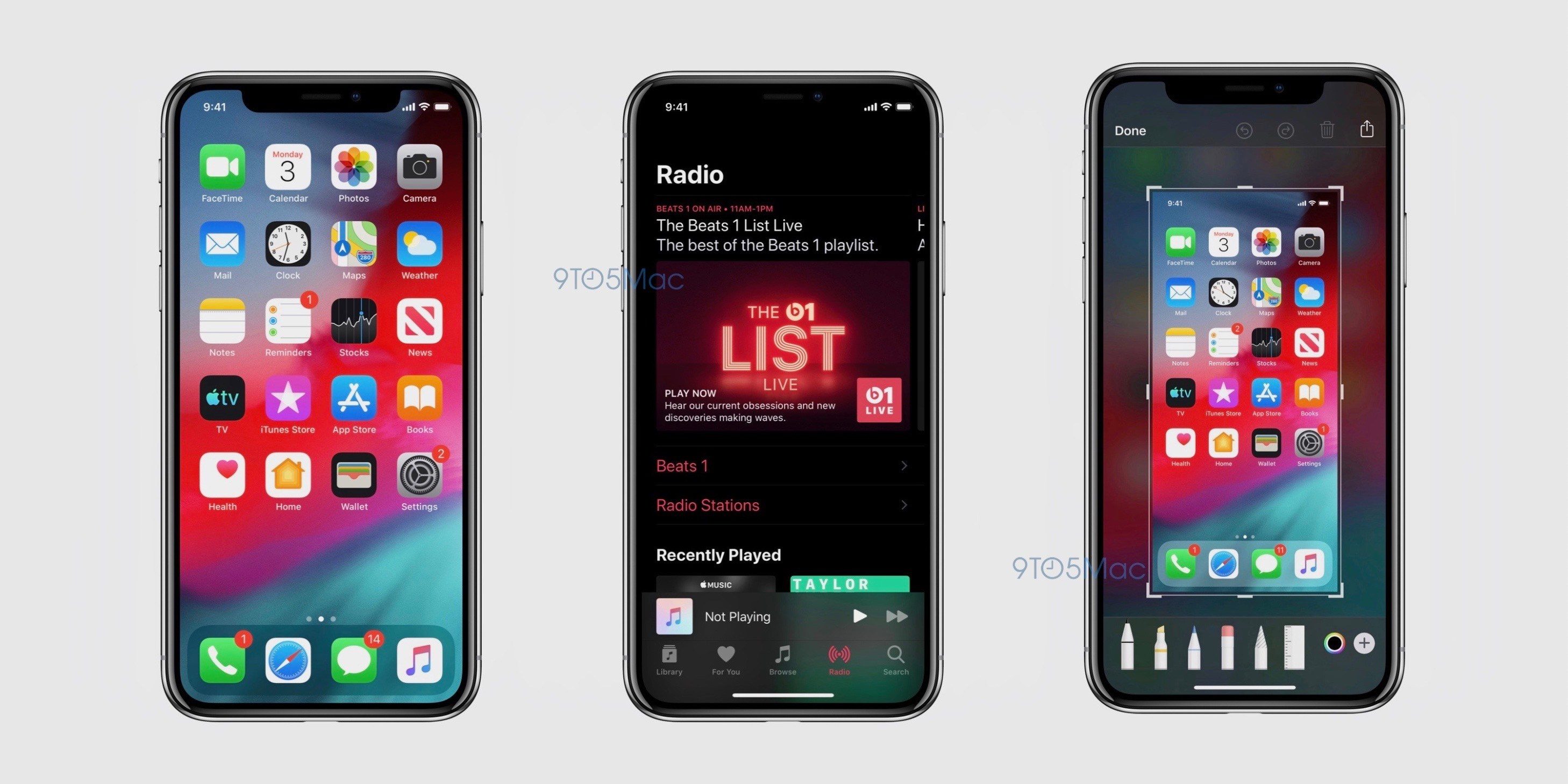
Apple finally will be giving iOS a dark mode. 


Rumored to be a part of iOS 13, the new feature is expected to be introduced when Apple shows off its latest software next week at its annual WWDC developer conference. In addition to looking crisper on the OLED displays found on the iPhone X, XS and XS Max the new mode may help with those devices' battery lives since OLED displays can keep those pixels off. 


The new dark mode is shown in the Apple Music app. The screen after taking a screenshot also looks to be getting a slight revamp, according to the leaked images.   


9to5Mac says the new mode can be enabled in Settings or through Control Center. 


In addition to dark mode, iOS 13 is expected to add improvements to iMessage, Maps and Reminders, mouse support for the iPad and improved speed for devices. It remains to be seen which iOS devices will get the update, with rumors suggesting those older than the iPhone 6S might not make the cut after getting iOS 12 last year. 


Source: 9to5mac


Windows
Mac OS
iOS
Linux
3uTools
Win 64-bit For this device
V9.0 2025-11-11
Download
Win 32-bit For this device
V9.0 2025-11-11
Download
3uTools
Intel Chip How to Identify Chip Type
V9.0 2025-12-02
Download
Apple Chip
V9.0 2025-12-02
Download
How to Identify Chip Type
1.  Click the Apple icon in the top-left corner of the screen and select About This Mac.
2.  Check the Processor or Chip field to determine if it is "Intel" or "Apple".
Please use the 3uTools PC client to install the iOS client:
1、 Install either the Windows or Mac version of 3uTools on your computer
2、 Open the PC client and connect your device to the computer via USB cable
3、 After the connection is successful, wait for the computer to automatically install the mobile app for the device, or locate “Install Mobile App” on the computer and manually click to install.
3uTools
deb file
V3.01 2025-11-20
Download
rpm file
V3.01 2025-11-20
Download
Windows
Windows
iOS
iOS
Android
Android
TV
TV
3uAirPlayer
Win 64-bit For this device
V6.0.2 2025-11-19
Download
Win 32-bit For this device
V6.0.2 2025-11-19
Download
iOS Device Mirroring (No App Required)
1、 Install 3uAirPlayer on the Windows PC
2、 Open Control Center and select Screen Mirroring
3、 From the list, choose your PC to start mirroring
4、 Or connect your iOS device to the PC via USB to begin mirroring
Scan to get "3uAirPlayer" App
3uAirPlayer TV V1.0.18
2025-11-28
TV System Requirements: Android 7.0 or later
Download the TV installation package, copy it to a USB drive, insert it into your TV or set-top box, then select the file from the home screen to install.