NEWS

Apple's First iPhone Game in over a Decade

05/07/2019

2401

Apple's First iPhone Game in over a Decade


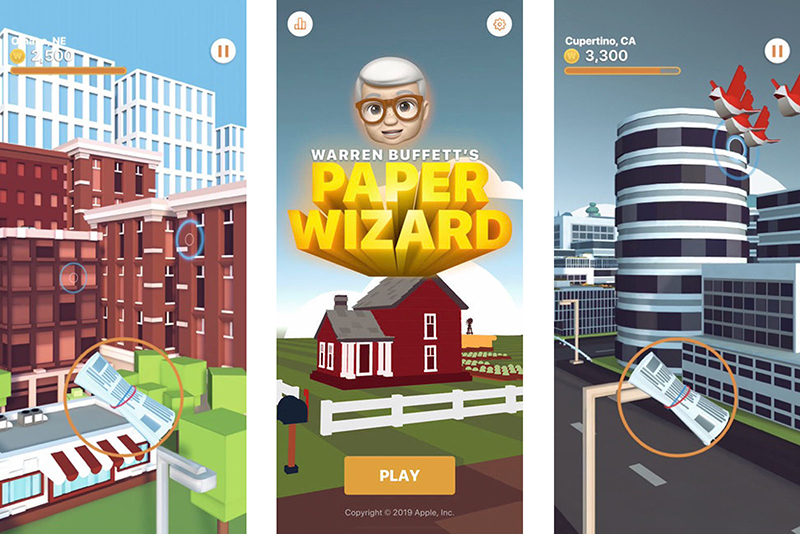
Apple doesn't do gags by half-measures, apparently. Tim Cook made an appearance at Berkshire Hathaway's annual meeting where he jokingly suggested in a short film that Warren Buffett could have a newspaper-tossing iPhone game, but it turns out that this wasn't just empty banter -- the game is real. Apple has released a Warren Buffett's Paper Wizard title for iPhones that has you tossing papers (much like Buffett did as a child) to earn "Warren Bucks" based on your delivery skills. Think of it as a first-person, touchscreen Paperboy for would-be billionaires.


The title is credited to "Wildlife Designs" in the App Store, but the splash screen and the game's terms make it clear that Apple is directly responsible.


That makes the app something of a milestone. As MacRumors noted, it's the first game Apple has released since 2008, when it created an iPhone-friendly version of its iPod title Texas Hold'em. No, this doesn't herald a return to regular in-house game development at Apple. However, it does show that Apple is willing to commit to the bit -- even if knows it's not about to produce a mobile gaming classic in the process.


Source: engadget

Windows
Mac OS
iOS
Linux
3uTools
Win 64-bit For this device
V9.0 2025-11-11
Download
Win 32-bit For this device
V9.0 2025-11-11
Download
3uTools
Intel Chip How to Identify Chip Type
V9.0 2025-12-02
Download
Apple Silicon
V9.0 2025-12-02
Download
How to Identify Chip Type
1.  Click the Apple icon in the top-left corner of the screen and select About This Mac.
2.  Check the Processor or Chip field to determine if it is "Intel" or "Apple".
Please use the 3uTools PC client to install the iOS client:
1、 Install either the Windows or Mac version of 3uTools on your computer
2、 Open the PC client and connect your device to the computer via USB cable
3、 After the connection is successful, wait for the computer to automatically install the mobile app for the device, or locate “Install Mobile App” on the computer and manually click to install.
3uTools
deb file
V3.01 2025-11-20
Download
rpm file
V3.01 2025-11-20
Download
Windows
Windows
iOS
iOS
Android
Android
TV
TV
3uAirPlayer
Win 64-bit For this device
V6.0.2 2025-11-19
Download
Win 32-bit For this device
V6.0.2 2025-11-19
Download
iOS Device Mirroring (No App Required)
1、 Install 3uAirPlayer on the Windows PC
2、 Open Control Center and select Screen Mirroring
3、 From the list, choose your PC to start mirroring
4、 Or connect your iOS device to the PC via USB to begin mirroring
Scan to get "3uAirPlayer" App
3uAirPlayer TV V1.0.18
2025-11-28
TV System Requirements: Android 7.0 or later
Download the TV installation package, copy it to a USB drive, insert it into your TV or set-top box, then select the file from the home screen to install.