 NEWS
NEWS
Apple Considering Offline Mode for Siri that could Process Voice Locally on an iPhone
 11/16/2018
 3021
3021
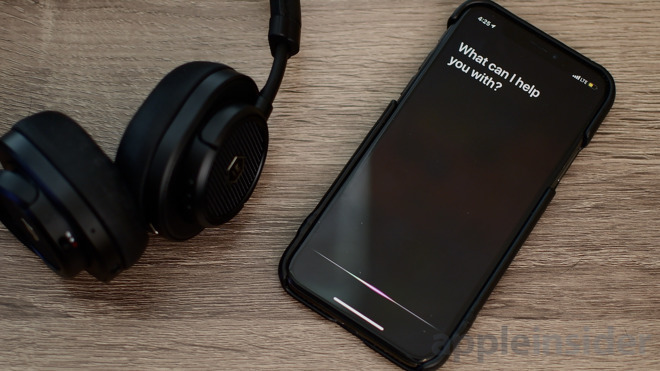
The way Siri typically works is that it listens to the user command when prompted, sends anonymized received speech data to Apple's servers, first converting from audio to plain text, then interpreting the command and sending the result back to the user's iPhone or iPad. The process of performing speech recognition is intensive, and is offloaded from devices to Apple's servers as it isn't necessarily capable of being performed on an item like an iPhone.
In the case of Siri, the reliance on servers means the virtual assistant isn't available if there isn't some form of internet connection, though the "Hey Siri" prompt will still trigger the service, if only to then display the offline message. According to an Apple patent application filing published on Thursday for an "Offline personal assistant," things may change in the future.
Rather than connected to Apple's servers, the filing suggests the speech-to-text processing and validation could happen on the device itself. On hearing the user make a request, the device in question will be capable of determining the task via onboard natural language processing, working out if the requested task as it hears it is useful, then performing it.
Apple suggests the use of an onboard system of modules to handle digital assistant queries that does not connect to the outside world. The collection of modules includes elements for speech synthesis, dialog processing, phonetic alphabet conversion based on a default vocabulary and user-created data, and a natural language processing module, among other items.
Depending on the recognized words and the structure of the query, the offline digital assistant could then perform a number of predefined tasks stored in the task flow processing module or service processing module. These two stores contain models for commonly-requested tasks, such as setting a timer or to play a song saved to the device, with the appropriate task model performed depending on the request.
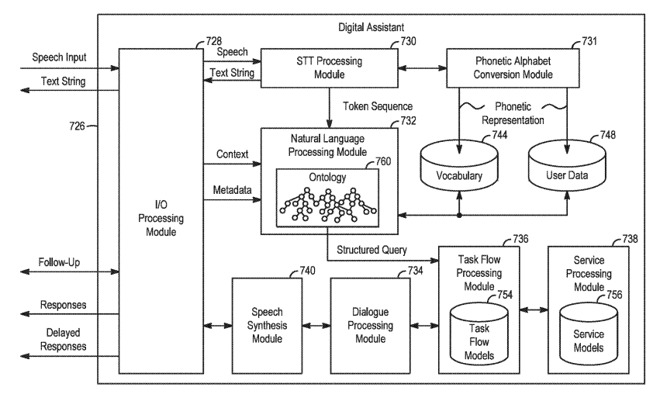
As part of the filing, Apple does suggest the use of machine learning mechanisms to perform specific types of task, including natural language processing. Such systems would be able to understand contextual information, making them extremely useful for determining what the user wants from a limited amount of on-device data, without accessing the internet.
Even with the on-device processing for offline use, the proposed system would still be able to go online if a connection is available, making the same system work in two different ways depending on the available connectivity.
Having access to local and remote processing would also provide the digital assistant two possible interpretations for the user's speech. In such cases, the system would determine a usefulness score for the locally-processed interpretation as well as that of the online-processed version, and perform the task based on which of the two processes scored higher.
This would effectively give the assistant a backup option, allowing the server-based processing to be used as an alternate interpretation if the locally-performed processing on the request comes up with an unusable result. In the event the server version times out or becomes unavailable, the local version is still available to use for the task.
Typically Apple files for many patents on a weekly basis, and while the concepts described do suggest areas where Apple has an interest, they are not guarantees that such systems will be included in the company's future products.
In the case of offline Siri, it seems quite plausible for Apple to go down this route. In its more recent iPhone launches, the A-series processor has included the Neural Engine, which is intended to perform computationally intensive tasks such as Face ID authentication and powering photography-related features, but it can also be used for tasks that use machine learning.
Considering the power of the second-generation Neural Engine used in the 2018 iPhone releases, it is entirely possible for an offline Siri to take advantage of the available power and machine learning capabilities to perform offline processing.
An offline mode is not the only way Apple could improve Siri, as it has worked on a number of different concepts to make the digital assistant better. One October patent explains how Siri could recognize specific users by their "voice print," with Apple also looking into enabling multi-user support with personalized responses.
Siri has already received some improvements relating to its recognition capabilities, including geographical voice models to help aid with regional queries and local language quirks. More visible to consumers is the introduction of Siri Shortcuts in iOS 12, which allows users to make their own personal Siri commands.
Source: appleinsider










