
NEWS

Apple to Fix iPhone XS Selfie "Beauty-gate" With iOS 12.1

10/24/2018

2761

After the beauty-gate brouhaha, Apple's tweaking the Smart HDR algorithm for selfies in the forthcoming update to iOS.
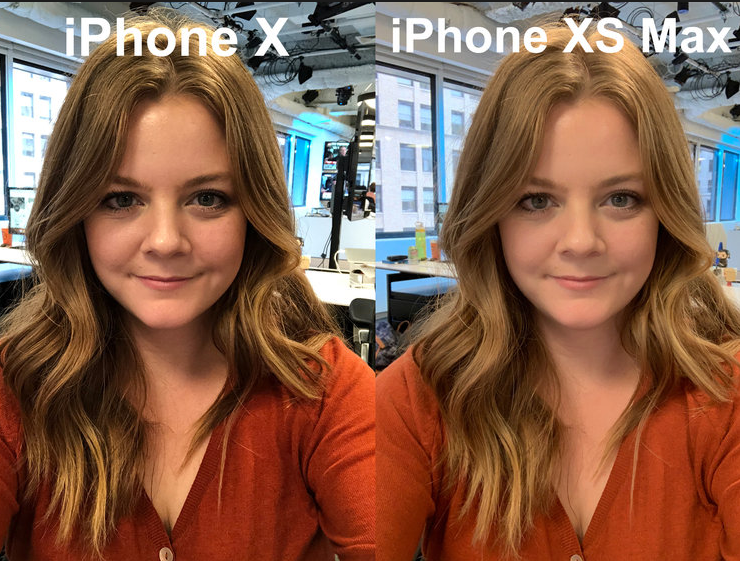

Apple to Fix iPhone XS Selfie

Spot the difference: iPhone X on left, XS on right.


If you're among those distressed by the new Apple iPhone XS' propensity for plastic-skinning your high-contrast selfies, you can relax now: The fix for beauty-gate is in. Or will be in, once the current beta of iOS 12.1 goes live.


The facial smoothing, first thought of as an unwanted "beauty mode" by some users on Reddit and YouTube, turned out to be isolated to the front camera's new Smart HDR mode. HDR modes shoot multiple frames at different exposures and then merge them to create a single frame with an optimized exposure.


Now Apple has confirmed the Smart HDR algorithm wasn't choosing the sharpest image to anchor its HDR merges, resulting in a loss of texture detail. iOS 12.1 will fix the issue by picking a sharper base frame. The Verge earlier reported the update. 


The company has tweaked the algorithm in the current beta of iOS 12.1, and separately confirmed to us that a future software update will allow previews of the portrait mode's depth effect before shooting on the iPhone XR. 


Source: cnet

Windows
Mac OS
iOS
Linux
3uTools
Win 64-bit For this device
V9.0 2025-11-11
Download
Win 32-bit For this device
V9.0 2025-11-11
Download
3uTools
Intel Chip How to Identify Chip Type
V9.0 2025-12-02
Download
Apple Chip
V9.0 2025-12-02
Download
How to Identify Chip Type
1.  Click the Apple icon in the top-left corner of the screen and select About This Mac.
2.  Check the Processor or Chip field to determine if it is "Intel" or "Apple".
Please use the 3uTools PC client to install the iOS client:
1、 Install either the Windows or Mac version of 3uTools on your computer
2、 Open the PC client and connect your device to the computer via USB cable
3、 After the connection is successful, wait for the computer to automatically install the mobile app for the device, or locate “Install Mobile App” on the computer and manually click to install.
3uTools
deb file
V3.01 2025-11-20
Download
rpm file
V3.01 2025-11-20
Download
Windows
Windows
iOS
iOS
Android
Android
TV
TV
3uAirPlayer
Win 64-bit For this device
V6.0.2 2025-11-19
Download
Win 32-bit For this device
V6.0.2 2025-11-19
Download
iOS Device Mirroring (No App Required)
1、 Install 3uAirPlayer on the Windows PC
2、 Open Control Center and select Screen Mirroring
3、 From the list, choose your PC to start mirroring
4、 Or connect your iOS device to the PC via USB to begin mirroring
Scan to get "3uAirPlayer" App
3uAirPlayer TV V1.0.18
2025-11-28
TV System Requirements: Android 7.0 or later
Download the TV installation package, copy it to a USB drive, insert it into your TV or set-top box, then select the file from the home screen to install.




