 NEWS
NEWS
Reddit Users are Angry iPhone XS Selfies are too Beautiful
 09/27/2018
 3594
3594
A number of iPhone XS users have expressed their concern regarding their selfies showing excessive skin smoothing effect in a Reddit thread, saying that the new flagship iPhones are apparently applying some sort of skin smoothing/beauty filter to the photos taken with the FaceTime camera by default and that there is no way to disable it.
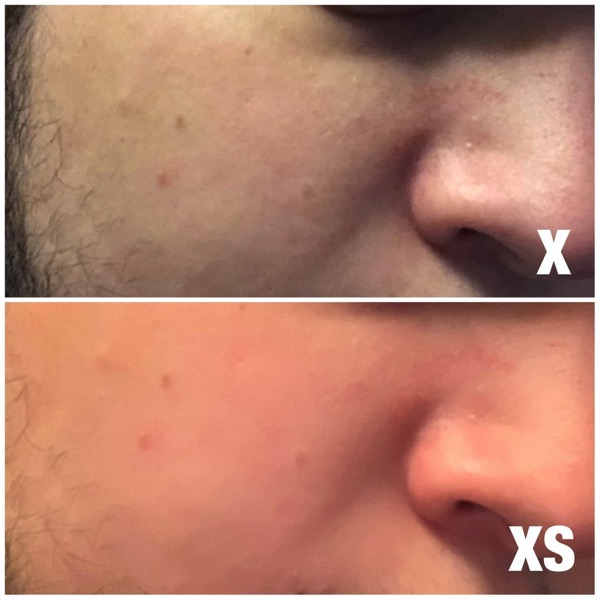
As you can see in the above example shared by a Reddit user, the difference in selfies taken from the iPhone X and the iPhone XS Max is quite obvious with later looking quite artificial.
As of now, there appears to be no option to reduce this beauty filter effect for selfies. Although the rear camera also tends to apply a certain degree of this beauty filter on faces of people, it can be toned down significant by turning off the Smart HDR feature.
Below are some interesting comments from a few angry iPhone XS users:
“iPhone XS: You are beautiful, look at you. A masterpiece of clear skin. Everything got better.
Mirror: NO DON’T FALL FOR HIM! DON‘T LISTEN TO HIM! YOU‘RE STILL UGLY. GO SEEK HELP.”
“The “filter” looks so shit as well. It’s like really poor photoshopping by someone trying to “airbrush” with no clue about how to subtly touch up a photo. Hint: caucasian skins aren’t dayglo orange.”
“I know it looks so bad. Mine almost makes me look like I’m a character from the sims whereas the x makes me look like… myself even if I’m a touch redder in the x”
“Dang! Here I was thinking my new phone was just able to more accurately capture my true beauty.
NOPE STILL UGLY”
It shouldn’t be long before Apple pushes an iOS update offering an option to turn off this beauty filter.
Source: iphoneincanada









