
NEWS

Apple Announces New iPhone Battery Repair Prices After $29 Offer Ends at End of Year

09/14/2018

2698

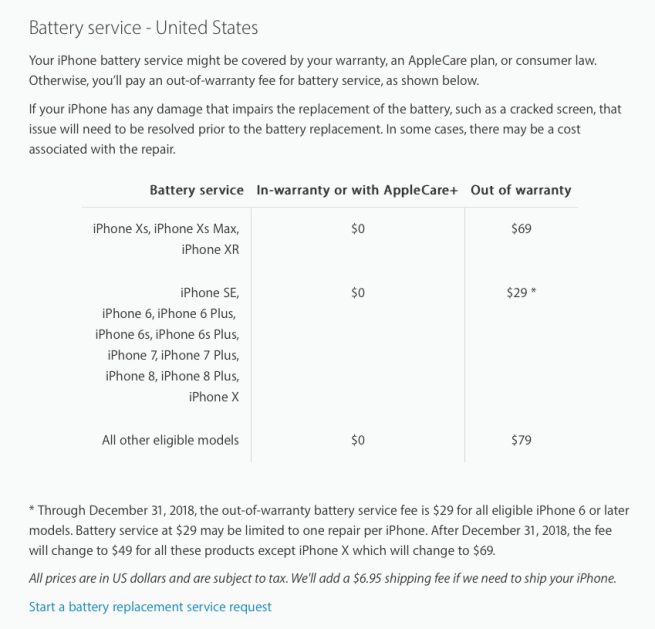
During the highs of BatteryGate, Apple reduced official battery repairs to $29 each through 2018, down from $79. Apple has now updated the page with details of what will happen from January 1st, 2019.


The prices are going back up, but not quite to the level that they were. Battery repairs for iPhone X, iPhone Xs and iPhone Xs will cost $69. Repairs for all older iPhones will cost $49.


That means if you have an iPhone X or earlier model, you can save at least $20 by initiating your battery repair before December 31st, 2018. iPhone X users have the most to save as the price jumps from $29 to $69.


Both the $49 and $69 price points is cheaper than the $79 Apple charged before the battery saga began. You can check the status of your iPhone battery by looking at the Battery Health statistics in the iOS Battery settings pane.


Batteries with lower capacity are more likely to be dynamically throttled by the system, which can slow the device. Apple lets you disable the throttling manually but then you risk getting many unexpected shutdowns.


Generally, Apple advises getting a battery repair when the capacity drops to 80% or lower. If an iPhone battery drops below 80% whilst still covered by the warranty, you can get the replacement battery for free.

Apple Announces New iPhone Battery Repair Prices After $29 Offer Ends at End of Year


Source: 9to5mac


Windows
Mac OS
iOS
Linux
3uTools
Win 64-bit For this device
V9.0 2025-11-11
Download
Win 32-bit For this device
V9.0 2025-11-11
Download
3uTools
Intel Chip How to Identify Chip Type
V9.0 2025-12-02
Download
Apple Chip
V9.0 2025-12-02
Download
How to Identify Chip Type
1.  Click the Apple icon in the top-left corner of the screen and select About This Mac.
2.  Check the Processor or Chip field to determine if it is "Intel" or "Apple".
Please use the 3uTools PC client to install the iOS client:
1、 Install either the Windows or Mac version of 3uTools on your computer
2、 Open the PC client and connect your device to the computer via USB cable
3、 After the connection is successful, wait for the computer to automatically install the mobile app for the device, or locate “Install Mobile App” on the computer and manually click to install.
3uTools
deb file
V3.01 2025-11-20
Download
rpm file
V3.01 2025-11-20
Download
Windows
Windows
iOS
iOS
Android
Android
TV
TV
3uAirPlayer
Win 64-bit For this device
V6.0.2 2025-11-19
Download
Win 32-bit For this device
V6.0.2 2025-11-19
Download
iOS Device Mirroring (No App Required)
1、 Install 3uAirPlayer on the Windows PC
2、 Open Control Center and select Screen Mirroring
3、 From the list, choose your PC to start mirroring
4、 Or connect your iOS device to the PC via USB to begin mirroring
Scan to get "3uAirPlayer" App
3uAirPlayer TV V1.0.18
2025-11-28
TV System Requirements: Android 7.0 or later
Download the TV installation package, copy it to a USB drive, insert it into your TV or set-top box, then select the file from the home screen to install.





