
NEWS

Apple Store in Burlingame Becomes Latest Target of Thieves

09/04/2018

2228


Another Bay Area Apple store was hit by a group of thieves. The latest was in Burlingame. This is the 5th one in less than two weeks.


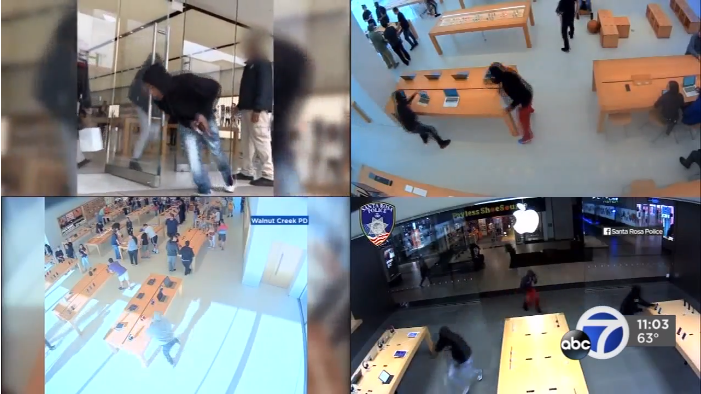
Burlingame police say four thieves raided the store on Burlingame Avenue at about 11:25 a.m. on Sunday.

"They just grab all the phones off the display phones, all the computers. They break the security cords and run out. They're in there for less than 30 seconds," said Burlingame Police Lieutenant Robert Boll.
Apple Store in Burlingame Becomes Latest Target of Thieves


Burlingame police say the teens or young men stole about $50,000 worth of merchandise. They ran out to a getaway car, believed to be a Volvo S70. The suspects' faces were covered by their cinched up hoodie sweatshirts.


Police say a security guard working outside the store was a good witness and was able to get pictures.

Burlingame police say this store has been hit more than three times before. They have yet to make an arrest in those cases.

Yesterday's theft was also the 5th one at Bay Area Apple stores since August 22.


Surveillance video has been released from all the locations including Corte Madera, Walnut Creek, Emeryville and Santa Rosa. Burlingame police say these appear to be connected, with all the same method.

Thieves get away with thousands of dollars worth of Apple products without confronting customers or employees.

That means they would just face burglary charges if caught.

Apple said they do not comment on security issues and referred us to local authorities.


Source: abc7news

Windows
Mac OS
iOS
Linux
3uTools
Win 64-bit For this device
V9.0 2025-11-11
Download
Win 32-bit For this device
V9.0 2025-11-11
Download
3uTools
Intel Chip How to Identify Chip Type
V9.0 2025-12-02
Download
Apple Chip
V9.0 2025-12-02
Download
How to Identify Chip Type
1.  Click the Apple icon in the top-left corner of the screen and select About This Mac.
2.  Check the Processor or Chip field to determine if it is "Intel" or "Apple".
Please use the 3uTools PC client to install the iOS client:
1、 Install either the Windows or Mac version of 3uTools on your computer
2、 Open the PC client and connect your device to the computer via USB cable
3、 After the connection is successful, wait for the computer to automatically install the mobile app for the device, or locate “Install Mobile App” on the computer and manually click to install.
3uTools
deb file
V3.01 2025-11-20
Download
rpm file
V3.01 2025-11-20
Download
Windows
Windows
iOS
iOS
Android
Android
TV
TV
3uAirPlayer
Win 64-bit For this device
V6.0.2 2025-11-19
Download
Win 32-bit For this device
V6.0.2 2025-11-19
Download
iOS Device Mirroring (No App Required)
1、 Install 3uAirPlayer on the Windows PC
2、 Open Control Center and select Screen Mirroring
3、 From the list, choose your PC to start mirroring
4、 Or connect your iOS device to the PC via USB to begin mirroring
Scan to get "3uAirPlayer" App
3uAirPlayer TV V1.0.18
2025-11-28
TV System Requirements: Android 7.0 or later
Download the TV installation package, copy it to a USB drive, insert it into your TV or set-top box, then select the file from the home screen to install.




