NEWS

Apple Store at Milan's Piazza Liberty Set to Open July 26

07/25/2018

2348

Apple Store at Milan's Piazza Liberty Set to Open July 26


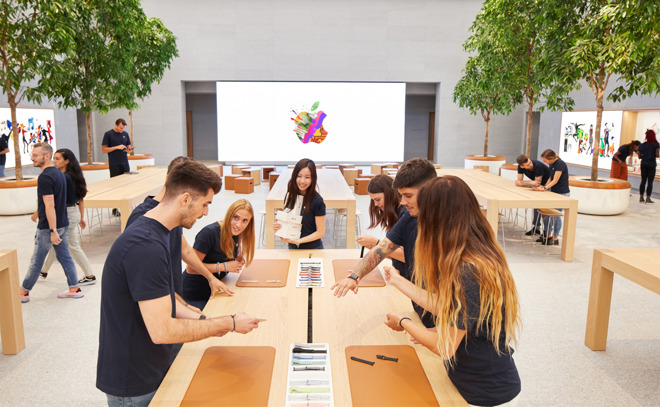
Apple held an "employee preview" Tuesday for the Piazza Liberty store, which is located next to a giant plaza, as well as a large glass fountain. Designed by Foster + Partners and located on the former site of the Apollo Spazio Cinema, the Milan store is one of the more ambitious architectural undertakings among Apple Store locations. 


The company 
had been using art to promote the new store, leading up to its opening. 
Apple Store at Milan's Piazza Liberty Set to Open July 26


There are 16 Apple Stores in Italy; Apple's first store in that country opened in Rome in 2007. Apple is also hosting a developer academy in Italy this year


"There's no better expression of our vision for Apple stores serving as modern-day gathering places than Apple Piazza Liberty," Angela Ahrendts, Apple's senior vice president of Retail, said as part of the announcement. "In a city with such rich history of art, entertainment and creativity, it's an honor to establish a space where anyone can be inspired to learn, create and connect with their neighbors."


Source: appleinsider

Windows
Mac OS
iOS
Linux
3uTools
Win 64-bit For this device
V9.0 2025-11-11
Download
Win 32-bit For this device
V9.0 2025-11-11
Download
3uTools
Intel Chip How to Identify Chip Type
V9.0 2025-12-02
Download
Apple Silicon
V9.0 2025-12-02
Download
How to Identify Chip Type
1.  Click the Apple icon in the top-left corner of the screen and select About This Mac.
2.  Check the Processor or Chip field to determine if it is "Intel" or "Apple".
Please use the 3uTools PC client to install the iOS client:
1、 Install either the Windows or Mac version of 3uTools on your computer
2、 Open the PC client and connect your device to the computer via USB cable
3、 After the connection is successful, wait for the computer to automatically install the mobile app for the device, or locate “Install Mobile App” on the computer and manually click to install.
3uTools
deb file
V3.01 2025-11-20
Download
rpm file
V3.01 2025-11-20
Download
Windows
Windows
iOS
iOS
Android
Android
TV
TV
3uAirPlayer
Win 64-bit For this device
V6.0.2 2025-11-19
Download
Win 32-bit For this device
V6.0.2 2025-11-19
Download
iOS Device Mirroring (No App Required)
1、 Install 3uAirPlayer on the Windows PC
2、 Open Control Center and select Screen Mirroring
3、 From the list, choose your PC to start mirroring
4、 Or connect your iOS device to the PC via USB to begin mirroring
Scan to get "3uAirPlayer" App
3uAirPlayer TV V1.0.18
2025-11-28
TV System Requirements: Android 7.0 or later
Download the TV installation package, copy it to a USB drive, insert it into your TV or set-top box, then select the file from the home screen to install.