 NEWS
NEWS
Apple's iPhone 9 Has An Unfixable Design Problem
 07/24/2018
 2333
2333
Apple is making a lot of changes with its upcoming new iPhones. One of the most exciting is how the company will slash prices to give iPhone fans a budget model with iPhone X-styling (details). But it will come with one unfixable design problem…
In a tweet, the prolific, mysterious, cat-loving and consistently reliable tipster Ice Universe has confirmed the so-called ‘budget iPhone X’ or ‘iPhone 9’ will not and cannot look like the more expensive second-generation iPhone X (details) and new iPhone X Plus (details) it will launch beside, due to budget constraints.
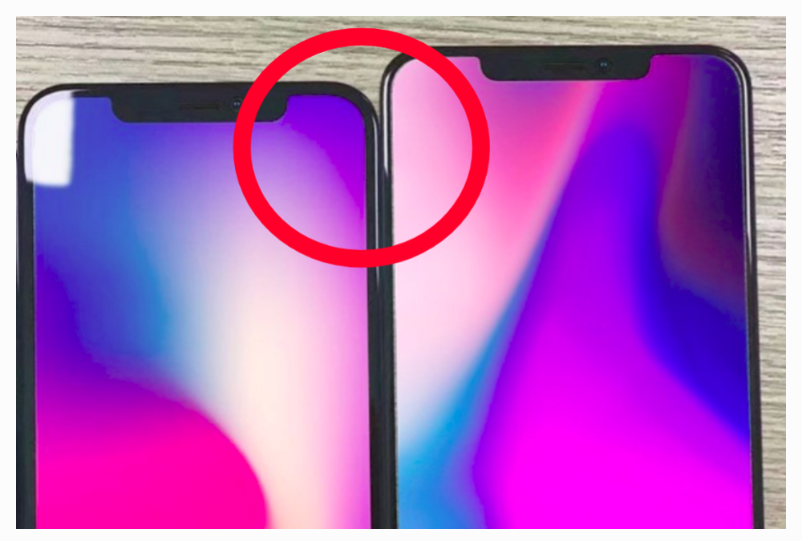
iPhone 9 render alongside the iPhone X Plus shows a best case bezel scenario
“The tempered film of the three iPhone 2018, we found that the 6.1-inch [budget] iPhone uses an LCD screen, its border is wider, and the 5.8 and 6.5-inch iPhone is an OLED screen with a narrower border.”
Yes, Geskin was right. Despite developing a new cutting-edge display connector, Apple cannot reduce the bezel on the cheaper phone’s LCD display to match that of the more expensive OLED models which simply bend their displays around the back so the connector sits out the way.
In a best-case scenario, the difference between them is quite small. In the worst case scenario, however, 3D modelling has shown this makes the iPhone 9 look like a toy.
Regardless, Apple deserves significant credit for creating an LCD iPhone which will have slimmer bezels than almost all Android OLED phones. It’s just a shame Apple is so determined to mimic the iPhone X and iPhone X Plus design, that the budget iPhone needlessly transfers its thicker bezel to the sides as well. It could (and probably should) have had its own unique look.
Instead, it will be these thick sides which give away the iPhone 9’s budget roots to others. That may prove to be a deal breaker for some buyers, more than the phone’s other (relatively minor) compromises.
My personal take? The premium models are taking risks too, so suck it up because the iPhone 9 price is too good to be true…
Source: forbes











