NEWS

Apple Releases Series of ‘Just Text Them the Money’ Apple Pay Cash Ads

07/16/2018

2795

Apple Releases Series of ‘Just Text Them the Money’ Apple Pay Cash Ads


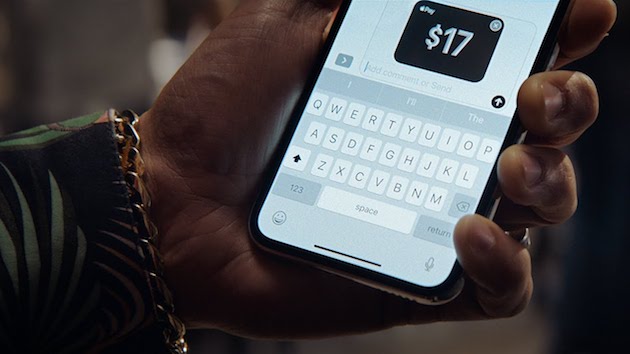
Apple has released a bunch of short 15-second ads under its ‘Just text them the money’ highlighting Apple Pay Cash. The series of ads show how Apple Pay Cash can be used right from within the Messages app to easily send money to someone.


The first ad shows how one can easily send their monthly rent to the landlord using Apple Pay Cash. The second shows a friend requesting money from their friend after he reveals that he lost the borrowed shirt.


The third ad is pretty hilarious and shows two friends discussing about having tickets to a game on Saturday even though their friend Phil is getting married on that day.


The last ad shows a mom sending money to her child using Apple Pay Cash after the latter sends her a picture of an empty fridge.


While initially introduced as a part of iOS 11, Apple released Apple Pay Cash to the public with the release of iOS 11.2. For now, the feature is only available in the United States via a partnership with the Green Dot Bank. There’s no word from Apple yet as to when the feature will expand to other markets and banks.


Source: iPhonehacks

Windows
Mac OS
iOS
Linux
3uTools
Win 64-bit For this device
V9.0 2025-11-11
Download
Win 32-bit For this device
V9.0 2025-11-11
Download
3uTools
Intel Chip How to Identify Chip Type
V9.0 2025-12-02
Download
Apple Chip
V9.0 2025-12-02
Download
How to Identify Chip Type
1.  Click the Apple icon in the top-left corner of the screen and select About This Mac.
2.  Check the Processor or Chip field to determine if it is "Intel" or "Apple".
Please use the 3uTools PC client to install the iOS client:
1、 Install either the Windows or Mac version of 3uTools on your computer
2、 Open the PC client and connect your device to the computer via USB cable
3、 After the connection is successful, wait for the computer to automatically install the mobile app for the device, or locate “Install Mobile App” on the computer and manually click to install.
3uTools
deb file
V3.01 2025-11-20
Download
rpm file
V3.01 2025-11-20
Download
Windows
Windows
iOS
iOS
Android
Android
TV
TV
3uAirPlayer
Win 64-bit For this device
V6.0.2 2025-11-19
Download
Win 32-bit For this device
V6.0.2 2025-11-19
Download
iOS Device Mirroring (No App Required)
1、 Install 3uAirPlayer on the Windows PC
2、 Open Control Center and select Screen Mirroring
3、 From the list, choose your PC to start mirroring
4、 Or connect your iOS device to the PC via USB to begin mirroring
Scan to get "3uAirPlayer" App
3uAirPlayer TV V1.0.18
2025-11-28
TV System Requirements: Android 7.0 or later
Download the TV installation package, copy it to a USB drive, insert it into your TV or set-top box, then select the file from the home screen to install.