 NEWS
NEWS
All Apple Park Employees Getting Standing Desks Because ‘Sitting is the New Cancer’
 06/15/2018
 3215
3215
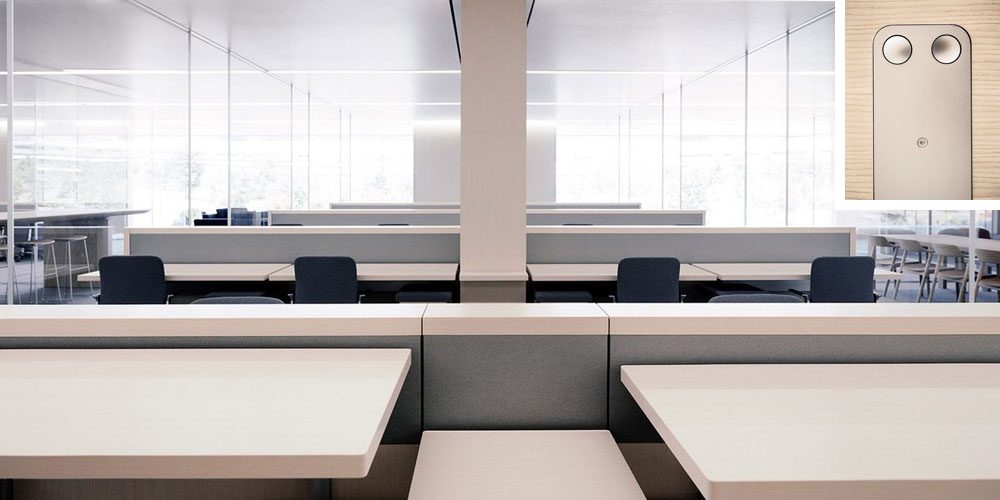
One of the things we learned during David Rubenstein’s interview of Tim Cook, posted in full yesterday, was that all employees at Apple Park are getting standing desks.
"We have given all of our employees, 100%, standing desks. If you can stand for a while, then sit, and so on and so forth, it’s much better for your lifestyle."
The desks allow employees to switch between sitting and standing.
As Business Insider notes, Cook has previously described sitting as ‘the new cancer.’ He made the comment back in 2015 when talking about the stand reminders on the Apple Watch.
"If I sit for too long, it will actually tap me on the wrist to remind me to get up and move, because a lot of doctors think sitting is the new cancer. Ten minutes before the hour, it will remind you to move. We have a lot of people using the Apple Watch at Apple, and ten minutes before the hour, suddenly they all get up and move. It took a little to get used to, but it’s great."
No details have yet been shared on which desks have been chosen, but we have seen them in interior photos of the campus. They have minimalist up/down controls, and my guess is that they were custom-made for Apple.

To accompany the desks, Apple opted for Vitra chairs rather than the Aeron ones chosen by most large organizations, in part because the company didn’t want staff getting too comfortable sitting for long periods of time.
"Today, you may have noticed, the prevailing ideal is that you spend most of your day collaborating with other people, that meetings and conference calls are the center of the workday. What quiet time you do have is spent wherever suits your mood."
Source: 9to5mac









