
NEWS

macOS Mojave Removes Integration With Third-Party Internet Accounts Like Twitter and Facebook

06/08/2018

2946

When Apple released iOS 11, the company removed built-in integration with Twitter, Facebook, Flickr, and Vimeo, a feature that allowed iPhone and iPad users to store their third-party account information and access it within apps that needed to use those services. 

The equivalent integration remains in macOS High Sierra, but Reddit user 
Marc1199 has noted that Apple appears to have removed support for third-party accounts completely in macOS 10.14 Mojave. 
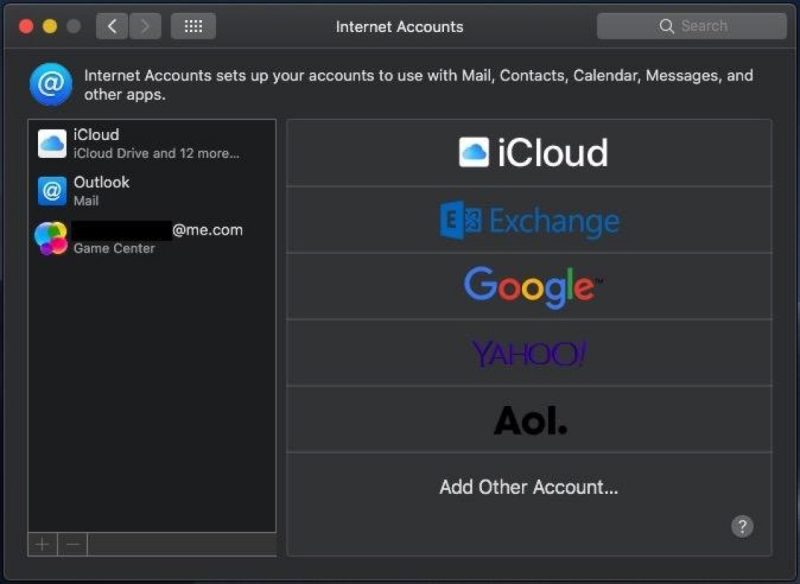
macOS Mojave Removes Integration With Third-Party Internet Accounts Like Twitter and Facebook


The image above shows the Internet Accounts preference pane in Mojave, with a distinct lack of OS login options for Facebook, Twitter, LinkedIn, Flickr, and Vimeo. 

The removal means that third-party sharing options previously available in Notification Center and other native apps are no longer be available, at least in the latest beta of Apple's new macOS. 

Dropping support for third-party social network accounts fits into Apple's vision of 
enhanced privacy protections in macOS 11.14 and iOS 12, both due to release in the fall. In the meantime, users running macOS High Sierra can remove lingering third-party accounts from their Macs with the help of our how-to guide.


Source: macrumors

Windows
Mac OS
iOS
Linux
3uTools
Win 64-bit For this device
V9.0 2025-11-11
Download
Win 32-bit For this device
V9.0 2025-11-11
Download
3uTools V3.18
2025-09-18
Please use the 3uTools PC client to install the iOS client:
1、 Install either the Windows or Mac version of 3uTools on your computer
2、 Open the PC client and connect your device to the computer via USB cable
3、 After the connection is successful, wait for the computer to automatically install the mobile app for the device, or locate “Install Mobile App” on the computer and manually click to install.
3uTools
deb file
V3.01 2025-11-20
Download
rpm file
V3.01 2025-11-20
Download
Windows
Windows
iOS
iOS
Android
Android
TV
TV
3uAirPlayer
Win 64-bit For this device
V6.0.2 2025-11-19
Download
Win 32-bit For this device
V6.0.2 2025-11-19
Download
iOS Device Mirroring (No App Required)
1、 Install 3uAirPlayer on the Windows PC
2、 Open Control Center and select Screen Mirroring
3、 From the list, choose your PC to start mirroring
4、 Or connect your iOS device to the PC via USB to begin mirroring
Scan to get "3uAirPlayer" App
3uAirPlayer TV V1.0.18
2025-11-28
TV System Requirements: Android 7.0 or later
Download the TV installation package, copy it to a USB drive, insert it into your TV or set-top box, then select the file from the home screen to install.




