 NEWS
NEWS
Apple’s App Store Redesign Improved App Discovery, Report Finds
 05/15/2018
 2427
2427
When Apple introduced its completely redesigned App Store last fall, one of its goals was to improve app discovery by placing a larger emphasis on editorial content – including things like “app of the day” picks, lists, how-to’s and even interviews with app developers, among other things. Now, a new study from Sensor Tower reveals those changes appear to have been working.
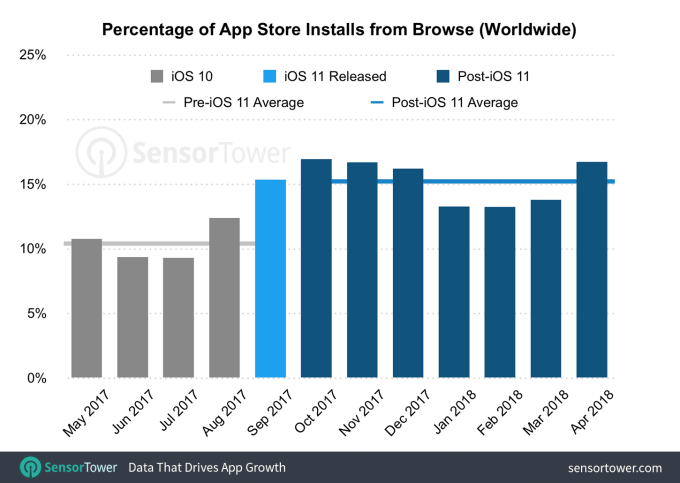
According to Sensor Tower’s findings, more apps are being discovered by way of browsing the App Store following the redesign launched in September.
Before, browse-driven downloads accounted for around 10 percent of all downloads. With the new App Store, they’ve grown to more than 15 percent. And that increase has held steady into 2018, even as the initial excitement around the App Store revamp has worn off.
Despite the growth in app discovery by browsing, searching for app by typing keywords into the search box is still, by far, the primary way consumers are finding and downloading new apps. Today, search accounts for 65 percent of downloads – well ahead of browse, referrals, or other methods.
Sensor Tower based its findings on data collected on app downloads between May 2017 and April 2018, it says.
The report also delved into the differences between how consumers discover apps and games.
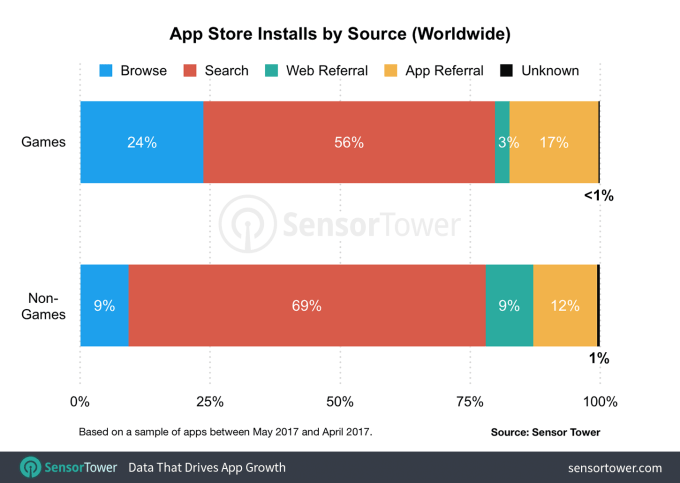
As it turns out, browsing plays a much more significant role in game discovery than it does for non-game apps. Only 56 percent of game downloads came from search, compared with 69 percent for non-games. Meanwhile, browse contributed to 24 percent of game downloads, compared to just 9 percent of non-game downloads.
What this seems to indicate is that iOS users are turning to the App Store and its editorial recommendations in greater numbers to learn about what new game to try next. Plus, the fact that games can now include a video preview, and labels like “Editor’s Choice” are better highlighted in the new App Store also likely help people get a better sense of which ones to install, as they browse.
Sensor Tower’s findings about game downloads line up with research released last month where it found that games that were featured as the “Game of the Day” could see their downloads increase by 802 percent, compared to the week prior to being featured. Apps, by comparison, saw boosts of 685 percent.
The new report’s findings are good news for Apple which had a sizable challenge to tackle with its App Store redesign. Its app marketplace had grown almost over-crowded over the years. And even after the big app cleanup, it still stands at over 2 million apps. Finding a way to better introduce favorites and newcomers to iOS users at this scale was a tall order, but the growth in apps discovered by way of browsing indicates Apple has seen some success on this front.
Source: techcrunch











