
NEWS

Apple Store Employees to Celebrate Earth Day With Green Shirts Starting This Week

04/13/2018

3537

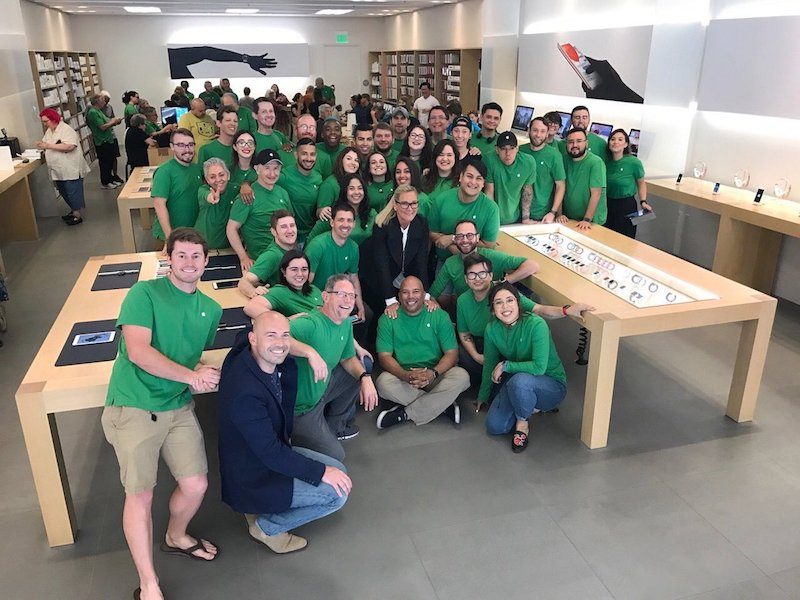
Apple Store employees will celebrate Earth Day by again wearing green shirts instead of traditional navy blue for the next few weeks. 
Apple Store Employees to Celebrate Earth Day With Green Shirts Starting This Week


Apple has already provided many of its retail employees with the new uniform, which they will begin wearing as early as Friday, April 13 in the United States, United Kingdom, Canada, and other countries, according to a reliable source. The new shirts will likely be worn at least through Earth Day on Sunday, April 22. 

A tipster who asked to be identified as The Apple Post informant today sent us photos of what appears to be the new uniform items. 
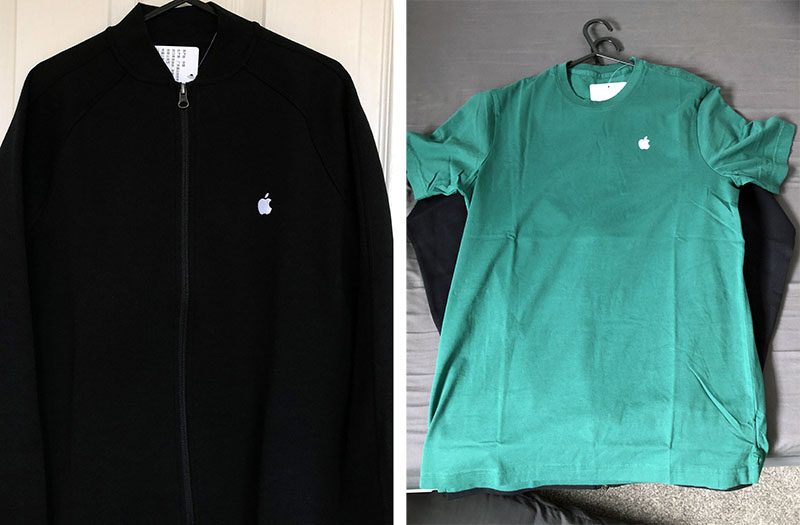
Apple Store Employees to Celebrate Earth Day With Green Shirts Starting This Week
Apple also celebrates Earth Day by adding a green leaf accent to the Apple logos at its retail stores around the world, and by offering an Earth Day activity challenge on Apple Watch. And, in recent years, Apple has shared a series of Earth Day videosApple Music playlists, and featured App Store apps

Apple will likely release its 2018 Environmental Responsibility Report around Earth Day, highlighting the company's commitment and progress in relation to recycling, renewable energy, and other green initiatives around the world. 

Earlier this week, Apple announced that its global facilities, including retail stores, offices, and data centers across 43 countries, are 
now powered with 100 percent renewable energy. In addition, an additional nine Apple suppliers around the world have committed to using renewable energy sources. 


Source: macrumors

Windows
Mac OS
iOS
Linux
3uTools
Win 64-bit For this device
V9.01 2025-12-27
Download
Win 32-bit For this device
V9.01 2025-12-27
Download
3uTools
Intel Chip How to Identify Chip Type
V9.01 2025-12-31
Download
Apple Silicon
V9.01 2025-12-31
Download
How to Identify Chip Type
1.  Click the Apple icon in the top-left corner of the screen and select About This Mac.
2.  Check the Processor or Chip field to determine if it is "Intel" or "Apple".
Please use the 3uTools PC client to install the iOS client:
1、 Install either the Windows or Mac version of 3uTools on your computer
2、 Open the PC client and connect your device to the computer via USB cable
3、 After the connection is successful, wait for the computer to automatically install the mobile app for the device, or locate “Install Mobile App” on the computer and manually click to install.
3uTools
deb file
V3.01 2025-11-20
Download
rpm file
V3.01 2025-11-20
Download
Windows
Windows
iOS
iOS
Android
Android
TV
TV
3uAirPlayer
Win 64-bit For this device
V6.0.2 2025-11-19
Download
Win 32-bit For this device
V6.0.2 2025-11-19
Download
iOS Device Mirroring (No App Required)
1、 Install 3uAirPlayer on the Windows PC
2、 Open Control Center and select Screen Mirroring
3、 From the list, choose your PC to start mirroring
4、 Or connect your iOS device to the PC via USB to begin mirroring
Scan to get "3uAirPlayer" App
3uAirPlayer TV V1.0.18
2025-11-28
TV System Requirements: Android 7.0 or later
Download the TV installation package, copy it to a USB drive, insert it into your TV or set-top box, then select the file from the home screen to install.




