
NEWS

Apple's AirPower Wireless Charging Pad is Probably Launching Any Day Now

03/14/2018

3070

The wait for Apple's 3-in-1 AirPower wireless charging pad that can charge an iPhone 8 or X, Apple Watch, and AirPods all at once may soon be over.


AirPower charging pad could launch sometime in March, and now, DigiTimes is backing up those claims with some evidence of its own.


AirPower will launch "by the end of March" and suppliers have already begun ramping up production for a "glass passivated package" (also called a "GPP bridge rectifier"), a key component of the wireless charging pad.


The AirPower will have a maximum wireless charging output of 29-watts. To put that into perspective, wireless chargers for the iPhone 8 and X only have a maximum output of 7.5-watts.
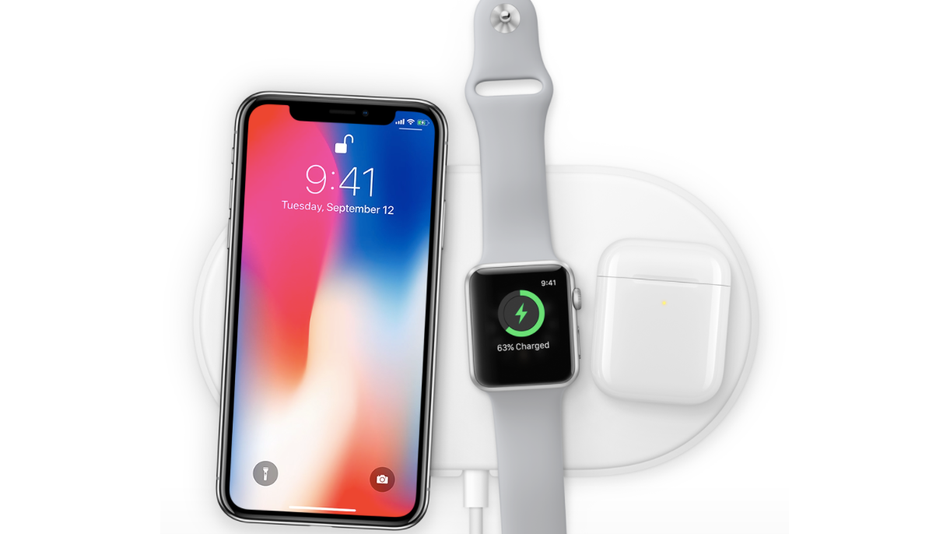

Apple's AirPower Wireless Charging Pad is Probably Launching Any Day Now


How this breaks down for actual charging is unclear. Will the max charging output be split equally between all three devices? Or will you be able to, say, charge up an iPhone X faster if there's no Apple Watch or AirPods on the pad simultaneously? 


Apple hasn't shared any new details on the AirPower since it was announced way back in September. More concerning might be the price of the thing: It's rumored to cost $200, which is kind of pricey if you ask us. 


Additionally, to wirelessly charge AirPods, users will need to buy a new wireless-equipped case that'll cost $69, further adding to the cost of Apple's wireless charging system.


Source: mashable

Windows
Mac OS
iOS
Linux
3uTools
Win 64-bit For this device
V9.0 2025-11-11
Download
Win 32-bit For this device
V9.0 2025-11-11
Download
3uTools
Intel Chip How to Identify Chip Type
V9.0 2025-12-02
Download
Apple Silicon
V9.0 2025-12-02
Download
How to Identify Chip Type
1.  Click the Apple icon in the top-left corner of the screen and select About This Mac.
2.  Check the Processor or Chip field to determine if it is "Intel" or "Apple".
Please use the 3uTools PC client to install the iOS client:
1、 Install either the Windows or Mac version of 3uTools on your computer
2、 Open the PC client and connect your device to the computer via USB cable
3、 After the connection is successful, wait for the computer to automatically install the mobile app for the device, or locate “Install Mobile App” on the computer and manually click to install.
3uTools
deb file
V3.01 2025-11-20
Download
rpm file
V3.01 2025-11-20
Download
Windows
Windows
iOS
iOS
Android
Android
TV
TV
3uAirPlayer
Win 64-bit For this device
V6.0.2 2025-11-19
Download
Win 32-bit For this device
V6.0.2 2025-11-19
Download
iOS Device Mirroring (No App Required)
1、 Install 3uAirPlayer on the Windows PC
2、 Open Control Center and select Screen Mirroring
3、 From the list, choose your PC to start mirroring
4、 Or connect your iOS device to the PC via USB to begin mirroring
Scan to get "3uAirPlayer" App
3uAirPlayer TV V1.0.18
2025-11-28
TV System Requirements: Android 7.0 or later
Download the TV installation package, copy it to a USB drive, insert it into your TV or set-top box, then select the file from the home screen to install.




