 NEWS
NEWS
Apple is Making Its Own High-end Noise-cancelling Headphones
 03/06/2018
 2710
2710
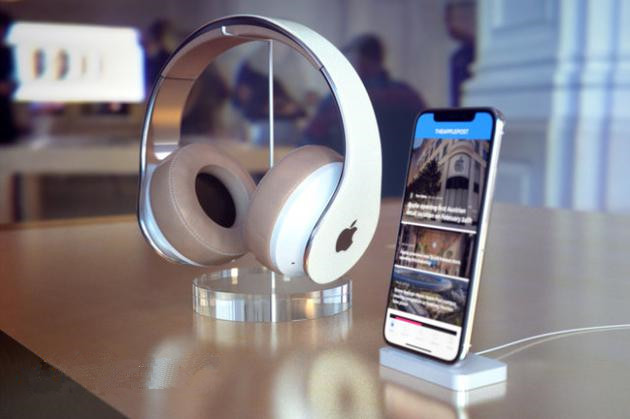
Apple is developing a pair of high-end wireless noise-cancelling headphones and could launch them as soon as the end of this year.
Gurman, who, like Kuo, has a long track record of reporting the existence of Apple devices before they’re released, says the headphones will be of the over-the-ear variety and would compete with similar pairs from Bose.
the headphones will also include “similar wireless pairing functionality” to Apple’s AirPods earbuds, suggesting they will likely include Apple’s W1 wireless chip (or its successor) and connect to iPhones and iPads more seamlessly than other devices. Given their over-the-ear design, they will likely sound superior to the AirPods as well.
Interestingly, the report says the headphones will bear the Apple logo. That would ostensibly put them in direct competition with the company’s Beats by Dre subsidiary, which currently sells its own pair of noise-cancelling headphones for $350. Those headphones already take advantage of Apple’s W1 chip.
How much the new headphones will cost is still unknown, but Bloomberg and KGI’s emphasis on Apple’s “high-end” ambitions suggests they will not come cheap. It’s worth noting that many of the current top options in the wireless noise-cancelling market are pricey as well, though: Bose’s QuietComfort 35 go for $350, while Sennheiser’s HD1 Wireless initially retailed for $500.
All that said, Bloomberg notes that development of the noise-cancelling headphones has not gone as smoothly as planned, likening Apple’s troubles to the issues it had developing its HomePod speaker. The company has gone through multiple redesigns of the product, according to the report, and there’s still a chance it could kill the device entirely.
Apple did not respond to a request for comment.
If the headphones do arrive as expected, though, they would solidify Apple’s seemingly renewed interest in consumer audio. Though the HomePod only just hit the market last month, the AirPods appear to be a hit. Apple does not directly report AirPods sales, instead rolling them into its “Other Products” category with the Apple Watch, Apple TV, Beats headphones, and other accessories. But that segment brought in $5.49 billion in sales in Q1 2018, according to Apple, a 37 percent year-over-year increase. While that number was no doubt boosted by the launch of a new Apple TV and Apple Watch, Apple said that its wearable products, which include the AirPods, jumped by 70 percent year-over-year.
Reports from Gurman and Kuo last month said that Apple is also working on new AirPodsmodels, which would likely include easier Siri activation, an improved wireless chip, and water resistance.
Source: arstechnica









