
NEWS

Saurik Enables Cydia Purchases on Jailbroken iOS 10.3.x Devices

02/26/2018

3767

Saurik Enables Cydia Purchases on Jailbroken iOS 10.3.x Devices


On Saturday, Saurik flipped the switch for making purchases through Cydia on jailbroken iOS 10.3.x devices.


The change lets anyone jailbroken by way of sticktron’s G0blin tool to purchase paid jailbreak tweaks and themes from the Cydia Store. Before today, this was only possible on jailbroken devices running iOS 10.2 and earlier with Yalu.


Saurik generally enables purchases on newly-jailbroken firmware once it’s proven stable enough. That said, one can now officially consider the G0blin jailbreak ‘as stable as it gets’ in its current form.


Notably, not all jailbreak tweaks and extensions have been updated with support for iOS 10.3.x, so this is something to keep in mind before breaking out the wallet to download mods on your device. As Sticktron adds, jailbreakers on iOS 10.3.x should give developers more time to update their packages:
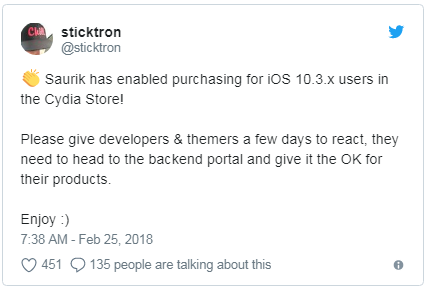

Saurik Enables Cydia Purchases on Jailbroken iOS 10.3.x Devices


As many would agree, it’s a step in the right direction for the jailbreak community. Then again, many are still anticipating Saurik’s official iOS 11 updates for both Cydia and Mobile Substrate. There’s no official ETA for them at this point in time.


Source: iDB

Windows
Mac OS
iOS
Linux
3uTools
Win 64-bit For this device
V9.0 2025-11-11
Download
Win 32-bit For this device
V9.0 2025-11-11
Download
3uTools
Intel Chip How to Identify Chip Type
V9.0 2025-12-02
Download
Apple Chip
V9.0 2025-12-02
Download
How to Identify Chip Type
1.  Click the Apple icon in the top-left corner of the screen and select About This Mac.
2.  Check the Processor or Chip field to determine if it is "Intel" or "Apple".
Please use the 3uTools PC client to install the iOS client:
1、 Install either the Windows or Mac version of 3uTools on your computer
2、 Open the PC client and connect your device to the computer via USB cable
3、 After the connection is successful, wait for the computer to automatically install the mobile app for the device, or locate “Install Mobile App” on the computer and manually click to install.
3uTools
deb file
V3.01 2025-11-20
Download
rpm file
V3.01 2025-11-20
Download
Windows
Windows
iOS
iOS
Android
Android
TV
TV
3uAirPlayer
Win 64-bit For this device
V6.0.2 2025-11-19
Download
Win 32-bit For this device
V6.0.2 2025-11-19
Download
iOS Device Mirroring (No App Required)
1、 Install 3uAirPlayer on the Windows PC
2、 Open Control Center and select Screen Mirroring
3、 From the list, choose your PC to start mirroring
4、 Or connect your iOS device to the PC via USB to begin mirroring
Scan to get "3uAirPlayer" App
3uAirPlayer TV V1.0.18
2025-11-28
TV System Requirements: Android 7.0 or later
Download the TV installation package, copy it to a USB drive, insert it into your TV or set-top box, then select the file from the home screen to install.




