
NEWS

Apple to Open New Retail Store in Vienna, Austria on February 24

02/02/2018

3074

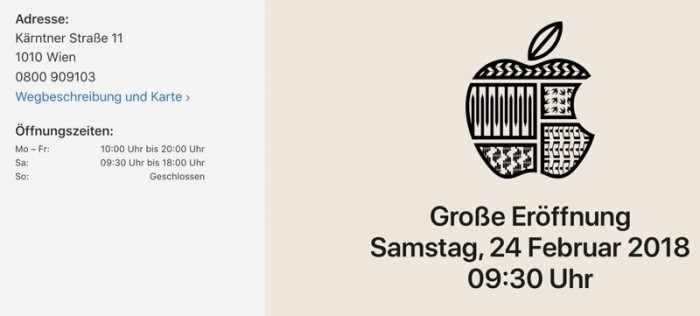
Apple will open a retail store in the Austrian capital of Vienna on Saturday, February 24 according to a new webpage for the store published recently on Apple's site. 

The new three-story Vienna Apple Store is located on Kärntner Straße, a famous shopping street in central Vienna, and for the last several months, Apple has been renovating the location. 


Kärntner Straße is near Stephansplatz, a square located at the center of Vienna that's home to the Stephansdom cathedral, which is known as one of the tallest churches in the world. The street is home to dozens of well-known retailers, like H&M, Forever 21, Zara, and more. 
Apple to Open New Retail Store in Vienna, Austria on February 24


Apple's building is located on a corner and has been outfitted with modern-looking glass panels that replace the former metalwork that was in place. The Vienna location will adopt the new store layout that's been rolling out around the world, with dedicated areas that include the Genius Grove, The Forum, and The Avenue, aka various parts of the store dedicated to support, classes, and shopping. 

Rumors of a new Apple Store in Vienna first began circulating in August of 2016, when it was reported that Apple was close to inking a deal for a flagship retail property that was formerly occupied by fashion company Esprit. Apple began 
posting job listings for the store a year ago in February of 2017. 

Ahead of the store's opening on February 24 at 9:30 a.m. local time, Apple will allow customers to make Genius Bar appointments and sign up for Today at Apple classes. 


Source: macrumors

Windows
Mac OS
iOS
Linux
3uTools
Win 64-bit For this device
V9.0 2025-11-11
Download
Win 32-bit For this device
V9.0 2025-11-11
Download
3uTools
Intel Chip How to Identify Chip Type
V9.0 2025-12-02
Download
Apple Chip
V9.0 2025-12-02
Download
How to Identify Chip Type
1.  Click the Apple icon in the top-left corner of the screen and select About This Mac.
2.  Check the Processor or Chip field to determine if it is "Intel" or "Apple".
Please use the 3uTools PC client to install the iOS client:
1、 Install either the Windows or Mac version of 3uTools on your computer
2、 Open the PC client and connect your device to the computer via USB cable
3、 After the connection is successful, wait for the computer to automatically install the mobile app for the device, or locate “Install Mobile App” on the computer and manually click to install.
3uTools
deb file
V3.01 2025-11-20
Download
rpm file
V3.01 2025-11-20
Download
Windows
Windows
iOS
iOS
Android
Android
TV
TV
3uAirPlayer
Win 64-bit For this device
V6.0.2 2025-11-19
Download
Win 32-bit For this device
V6.0.2 2025-11-19
Download
iOS Device Mirroring (No App Required)
1、 Install 3uAirPlayer on the Windows PC
2、 Open Control Center and select Screen Mirroring
3、 From the list, choose your PC to start mirroring
4、 Or connect your iOS device to the PC via USB to begin mirroring
Scan to get "3uAirPlayer" App
3uAirPlayer TV V1.0.18
2025-11-28
TV System Requirements: Android 7.0 or later
Download the TV installation package, copy it to a USB drive, insert it into your TV or set-top box, then select the file from the home screen to install.




