 NEWS
NEWS
With iOS 11.3, Apple Looks to Unite Patients and Their Healthcare Data
 01/30/2018
 2610
2610
After touting an EMR-sharing feature in its upcoming iOS 11.3 release, Apple said 12 hospitals have signed on to beta test the software, which will allow patients and healthcare providers to interact on iPhones and iPads.
Apple has announced that its upcoming iOS 11.3 release will allow patients to view electronic medical records (EMRs) and other clinical information about themselves on iPhones and iPads.
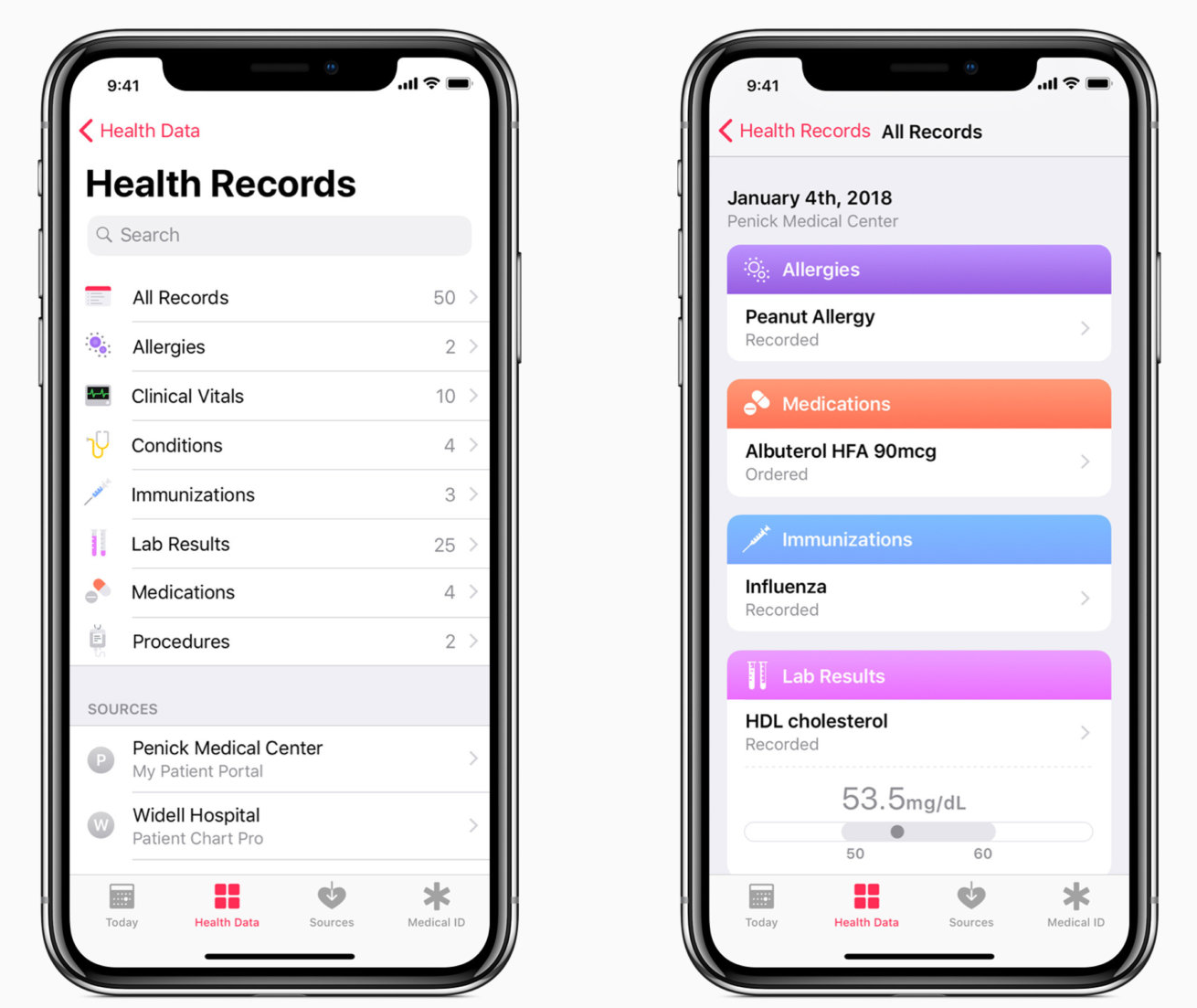
Apple's new Health Records feature uses the existing Health app (released in 2014 on iOS 8) to enable medical facilities to connect via an API to their EMR systems to share data between providers and patients.
The new Health Record feature is currently available to the patients of 12 hospital systems via the iOS 11.3 beta, according to Apple. Apple's Health Records home page. New capabilities in Health Records help patients see medical records from multiple providers.
"In the coming months, more medical facilities will connect to Health Records offering their patients access to this feature," Apple said in its announcement. The medical facilities that have signed on to beta test the Health Record feature include:
* Johns Hopkins Medicine - Baltimore, Md.
* Cedars-Sinai - Los Angeles, Calif.
* Penn Medicine - Philadelphia, Pa.
* Geisinger Health System - Danville, Pa.
* UC San Diego Health - San Diego, Calif.
* UNC Health Care - Chapel Hill, N.C.
* Rush University Medical Center - Chicago, Ill.
* Dignity Health - Arizona, California and Nev.
* Ochsner Health System - Jefferson Parish, La.
* MedStar Health - Washington, D.C., Maryland and Virginia
* OhioHealth - Columbus, Ohio
* Cerner Healthe Clinic - Kansas City, Mo.
Last year, building on its health informatics platform, Apple released HealthKit, a developer API that was part of the iOS software development kit; it allowed third-party developers to create applications that can be used through the Health app.
Last week, Apple announced the update to the Health app with the iOS 11.3 beta, enabling mobile users to see EMRs on their iPhone. The updated Health Records section within the Health app brings together hospitals, clinics and the existing app to make it easy for users to see available medical data from multiple providers whenever they choose.
John Halamka, CIO at CareGroup Healthcare System and CIO and associate dean for educational technology at Harvard Medical School, said EMR sharing will sometimes be solely between healthcare providers and sometimes be provider to patient and back to provider.
In a provider-to-provider scenario, a radiologist may share information with a cardiologist, for example. In the provider-to-patient-to-provider scenario, a physician may share test results with a patient and the patient may then schedule a follow-up appointment.
The Health Information Technology for Economic and Clinical Health(HITECH) Act of 2009 required all healthcare facilities to roll out EMRs and prove through Meaningful Use standards that they were functioning as required.
While Meaningful Use standards required every EHR have a patient portal, the records were not easily shared between disparate healthcare facilities.
Apple’s new Health Records feature will enable consumers to see their available medical data from multiple providers, whenever they choose – eliminating the need for multiple logins.
Westmed Medical Group, a 500 provider multi-specialty medical group in Westchester County, N.Y. and Fairfield County, Conn., recently rolled out the Bridge Patient Portal Version 2.0 and the Universe mHealth App from Universe mHealth LLC.
The application allows patients to not only view their EMRs, send messages to healthcare providers, view lab results and manage appointments and refills, but also allows them to pay bills via a PCI-compliant payment service from TrustCommerce. The features can be used via an iOS and Android mobile app.
When Westmed initially rolled out the EMR portal in October, it did come with a few "glitches," according to Merin Joseph, CIO at Westmed. For example, some messaging to patients was getting stuck in spam folders because they were being marked by email apps as vendor lists.
Westmed expects to begin its marketing campaign this month to let its patients know about the features now available to them via their smart phones, tablets and laptops.
Apple's concept is to leverage the Fast Healthcare Interoperability Resources interface, a set of standards that will soon be available in every major EHR to consolidate lifetime clinical records from different providers on mobile devices, Halamka said.
In the past, consumers have voiced fear around something as personal as a medical record being introduced in electronic form. Healthcare information is arguably the most sensitive data there is because once it's disclosed, it can be used by cyber criminals for nefarious purposes for a lifetime.
A 2016 study by the Brookings Institute showed that since late 2009, the medical information of more than 155 million Americans has been exposed without their permission through about 1,500 breaches.
The prospect of healthcare data being shared via Apple on mobile devices could exacerbate those concerns.
Patients from participating medical institutions will have information from various institutions organized into one view and get regular notifications about their lab results, conditions, immunizations, medications, procedures and vital stats. Patients will receive notifications when their data is updated.
Source: computerworld









