
NEWS

Apple Store in Zurich Evacuated As Phone Battery Overheats

01/10/2018

2263

ZURICH-An overheated iPhone battery injured a repairman in an Apple store in Zurich and prompted the evacuation of around 50 people from the shop on Tuesday due to smoke, Swiss police said.


Zurich police said the incident occurred as the repair worker was removing the battery, which overheated and burned his hand slightly.


“At the same time, there was a slight build-up of smoke, which led to around 50 customers and employees having to leave the business temporarily,” a police statement said.
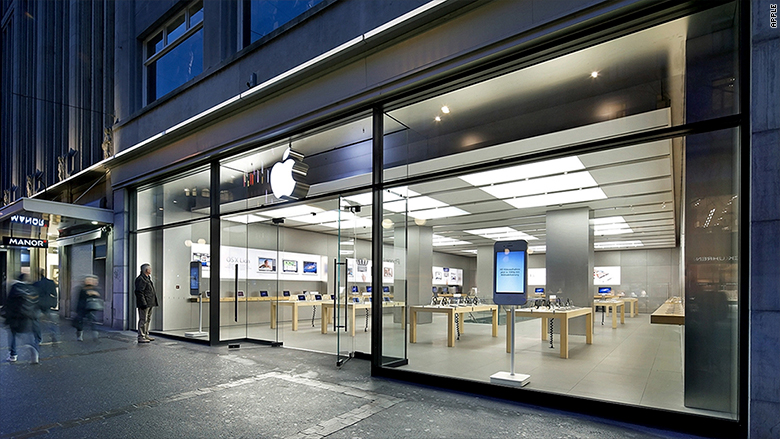

Apple Store in Zurich Evacuated As Phone Battery Overheats


“The staff responded well and correctly. It sprinkled quartz sand over the overheated battery so that the smoke could be contained and sucked out after switching on the ventilation.”


Seven people received medical treatment but did not need to be hospitalized.


Forensic specialists were examining what caused the incident, police said.


Apple had no immediate comment beyond the police statement.


Windows
Mac OS
iOS
Linux
3uTools
Win 64-bit For this device
V9.01 2025-12-27
Download
Win 32-bit For this device
V9.01 2025-12-27
Download
3uTools
Intel Chip How to Identify Chip Type
V9.0 2025-12-02
Download
Apple Silicon
V9.0 2025-12-02
Download
How to Identify Chip Type
1.  Click the Apple icon in the top-left corner of the screen and select About This Mac.
2.  Check the Processor or Chip field to determine if it is "Intel" or "Apple".
Please use the 3uTools PC client to install the iOS client:
1、 Install either the Windows or Mac version of 3uTools on your computer
2、 Open the PC client and connect your device to the computer via USB cable
3、 After the connection is successful, wait for the computer to automatically install the mobile app for the device, or locate “Install Mobile App” on the computer and manually click to install.
3uTools
deb file
V3.01 2025-11-20
Download
rpm file
V3.01 2025-11-20
Download
Windows
Windows
iOS
iOS
Android
Android
TV
TV
3uAirPlayer
Win 64-bit For this device
V6.0.2 2025-11-19
Download
Win 32-bit For this device
V6.0.2 2025-11-19
Download
iOS Device Mirroring (No App Required)
1、 Install 3uAirPlayer on the Windows PC
2、 Open Control Center and select Screen Mirroring
3、 From the list, choose your PC to start mirroring
4、 Or connect your iOS device to the PC via USB to begin mirroring
Scan to get "3uAirPlayer" App
3uAirPlayer TV V1.0.18
2025-11-28
TV System Requirements: Android 7.0 or later
Download the TV installation package, copy it to a USB drive, insert it into your TV or set-top box, then select the file from the home screen to install.




