 NEWS
NEWS
iOS 11.2.5 Beta 3 Released with Increased Volume on Keyboard Clicks & Dial Sounds
 01/04/2018
 2485
2485
Apple released the third developer beta for iOS 11.2.5 on Wednesday, and public beta testers can expect it the following day. The update comes two full weeks after the release of the second beta, marking an extended update period of Apple. The second beta mostly brought under the hood improvements to 11.2.5.
To get the update, you'll need to be a developer with a valid configuration profile. Or you can just upgrade on 3uTools.
In addition to more anticipated routine bug and security fixes, beta 3 appears to bring louder keyboard clicks and dial sounds in the Phone app. 9to5Mac compared the dial sounds in both beta 2 and beta 3, and the results are noticeably different.
Not many other specifics are known at this time, but we expect, as usual, for the third beta to include bug and security fixes Apple has found since the release of the beta 2.
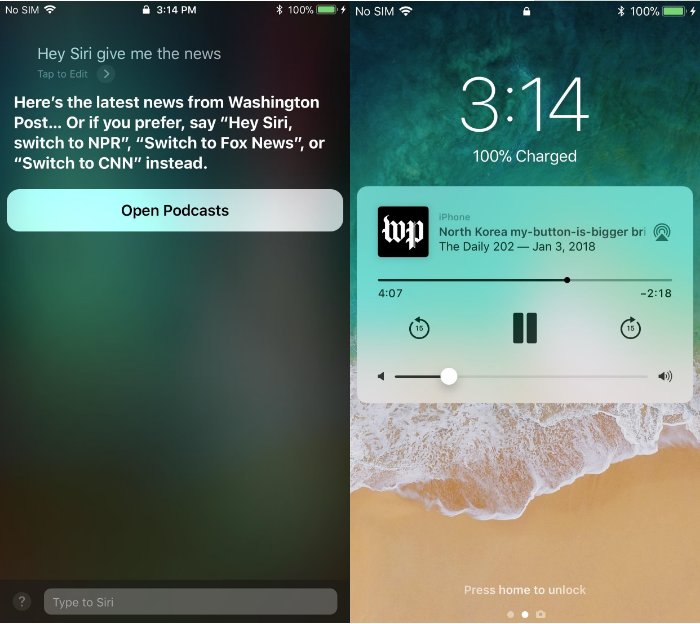
However, recently discovered in the previous betas, and still available in beta 3, is the ability to ask Siri for a daily news podcast from The Washington Post, NPR, Fox News, or CNN, which is likely a feature targeted at the upcoming HomePod since you can only access it by saying "Hey Siri, give me the news" or when using headphones or CarPlay, and not with something like "Type to Siri."
Apple took longer to update 11.2.5 this time around, presumably for the holidays. Beta 2 followed beta 1 after only one week, which is typical for Apple. Now that the holiday season has ended, we expect Apple to return to a regular update schedule, however, it is possible the company will continue to issue updates irregularly.
An update is expected from the company to address the scandalous iPhone slow-downs discovered at the end of last year. This update is thought to include more user-facing information about iPhone battery health in the wake of criticism for Apple's lack of transparency.
Source: ios.gadgethacks









