
NEWS

Wikipedia for iOS Adds New Black Mode for iPhone X’s OLED Display

12/22/2017

3102

Joining the ever-growing list of apps adding support and optimization for iPhone X, Wikipedia has updated its iOS app with a new “Black” mode that takes full advantage of the device’s OLED display…
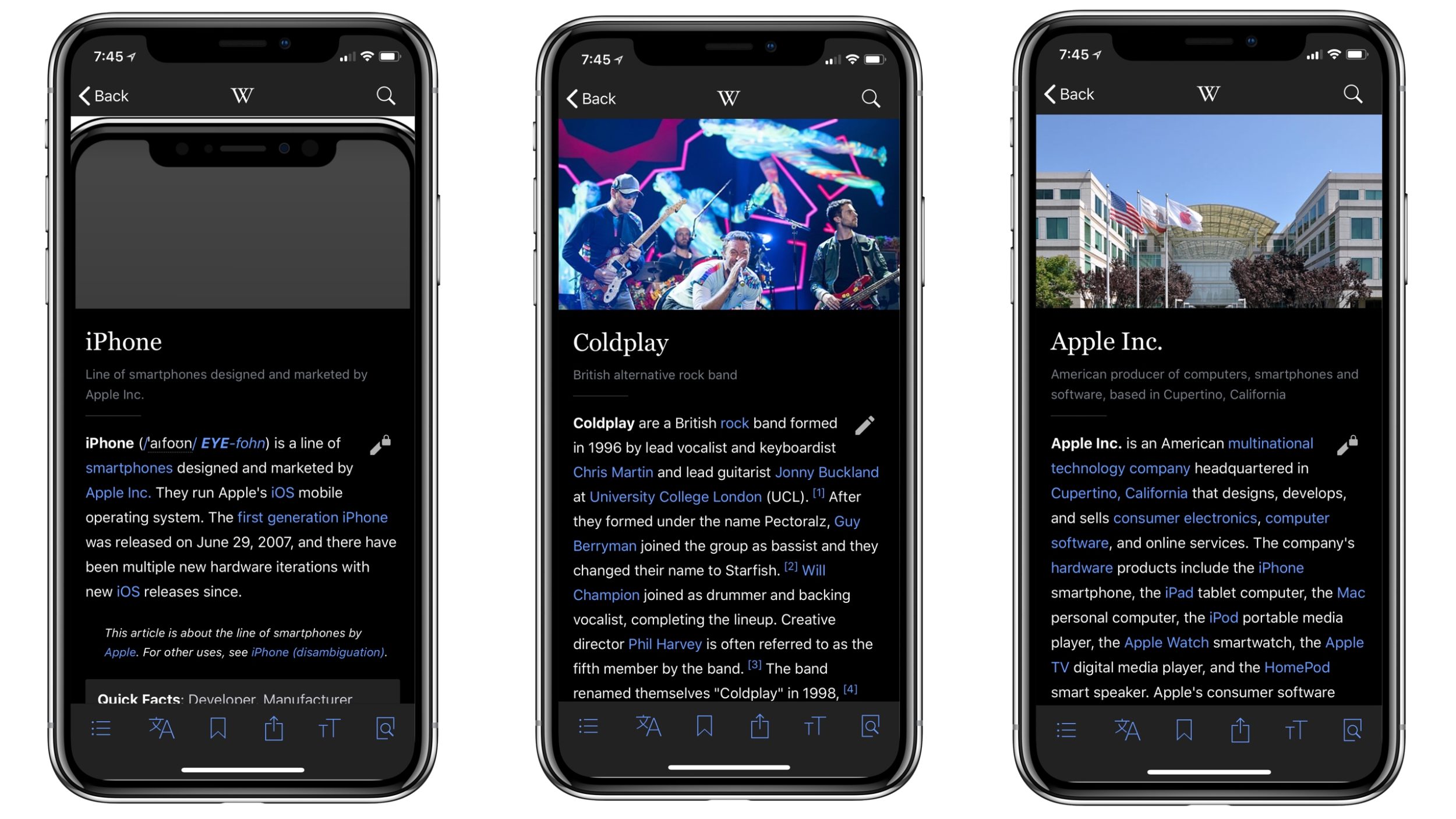

Wikipedia for iOS Adds New Black Mode for iPhone X’s OLED Display


The update comes as part of version 5.7.3 of Wikipedia for iOS. In addition to the new “Black reading theme,” you also get improvements to article loading and data usage, as well as new appearance options:


What’s New in Version 5.7.3


“Black” reading theme, perfect for OLED devices

Faster article loading and less data use. Now images are only downloaded when about to be displayed (or saved).

Appearance option to have info boxes open by default

Lots of other small bug fixes.

In order to enable the new OLED-focused theme, launch Wikipedia for iPhone, tap the settings icon in the upper-left corner, choose “Appearance” and switch to the “Black” option. The black theme does look pretty slick on the OLED iPhone X and it’s certainly nice to see developers taking advantage of the new display capabilities.


Wikipedia is a free download on the App Store.


Source: 9to5mac


Windows
Mac OS
iOS
Linux
3uTools
Win 64-bit For this device
V9.0 2025-11-11
Download
Win 32-bit For this device
V9.0 2025-11-11
Download
3uTools
Intel Chip How to Identify Chip Type
V9.0 2025-12-02
Download
Apple Silicon
V9.0 2025-12-02
Download
How to Identify Chip Type
1.  Click the Apple icon in the top-left corner of the screen and select About This Mac.
2.  Check the Processor or Chip field to determine if it is "Intel" or "Apple".
Please use the 3uTools PC client to install the iOS client:
1、 Install either the Windows or Mac version of 3uTools on your computer
2、 Open the PC client and connect your device to the computer via USB cable
3、 After the connection is successful, wait for the computer to automatically install the mobile app for the device, or locate “Install Mobile App” on the computer and manually click to install.
3uTools
deb file
V3.01 2025-11-20
Download
rpm file
V3.01 2025-11-20
Download
Windows
Windows
iOS
iOS
Android
Android
TV
TV
3uAirPlayer
Win 64-bit For this device
V6.0.2 2025-11-19
Download
Win 32-bit For this device
V6.0.2 2025-11-19
Download
iOS Device Mirroring (No App Required)
1、 Install 3uAirPlayer on the Windows PC
2、 Open Control Center and select Screen Mirroring
3、 From the list, choose your PC to start mirroring
4、 Or connect your iOS device to the PC via USB to begin mirroring
Scan to get "3uAirPlayer" App
3uAirPlayer TV V1.0.18
2025-11-28
TV System Requirements: Android 7.0 or later
Download the TV installation package, copy it to a USB drive, insert it into your TV or set-top box, then select the file from the home screen to install.




