
NEWS

Chinese Clothing Label Sues App Store Logo Breaks Copyright

12/21/2017

2627

A Chinese clothing brand, Kon, is suing Apple for copyright infringement, claiming that the logo for the iOS 11 and macOS High Sierra App Stores too closely resembles its own.
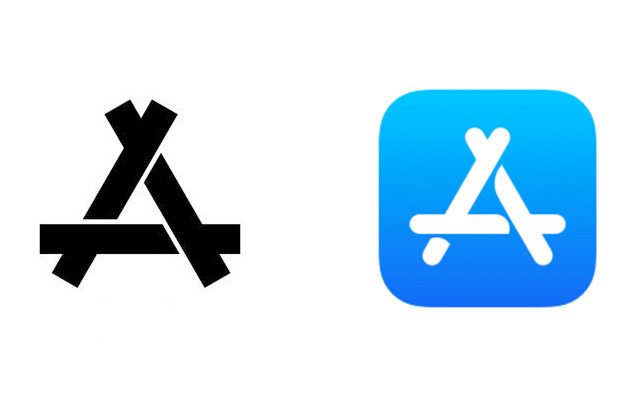

Chinese Clothing Label Sues App Store Logo Breaks Copyright

Kon is demanding financial compensation and a public apology, as well as an injunction against infringing devices, Phone Radar said on Tuesday. The case was filed through a Beijing court, and a judgment will allegedly be rendered within the next few weeks. 


Both logos share a triangular "stick" design. The current App Store emblem is an abstract version of an earlier one, in which the sticks were a pencil, brush, and ruler.


The close similarity of the logos could make the lawsuit unusually difficult for Apple. A strong possibility is that Apple will choose to settle, as it eventually did in the matter of a Chinese leather goods company using the "iPhone" name. 


A deal would likely allow Apple to keep using the latest App Store graphics in iOS, macOS, and related marketing. The company could revert, but would have to spend millions of dollars in rebranding.


Source: appleinsider

Windows
Mac OS
iOS
Linux
3uTools
Win 64-bit For this device
V9.0 2025-11-11
Download
Win 32-bit For this device
V9.0 2025-11-11
Download
3uTools
Intel Chip How to Identify Chip Type
V9.0 2025-12-02
Download
Apple Silicon
V9.0 2025-12-02
Download
How to Identify Chip Type
1.  Click the Apple icon in the top-left corner of the screen and select About This Mac.
2.  Check the Processor or Chip field to determine if it is "Intel" or "Apple".
Please use the 3uTools PC client to install the iOS client:
1、 Install either the Windows or Mac version of 3uTools on your computer
2、 Open the PC client and connect your device to the computer via USB cable
3、 After the connection is successful, wait for the computer to automatically install the mobile app for the device, or locate “Install Mobile App” on the computer and manually click to install.
3uTools
deb file
V3.01 2025-11-20
Download
rpm file
V3.01 2025-11-20
Download
Windows
Windows
iOS
iOS
Android
Android
TV
TV
3uAirPlayer
Win 64-bit For this device
V6.0.2 2025-11-19
Download
Win 32-bit For this device
V6.0.2 2025-11-19
Download
iOS Device Mirroring (No App Required)
1、 Install 3uAirPlayer on the Windows PC
2、 Open Control Center and select Screen Mirroring
3、 From the list, choose your PC to start mirroring
4、 Or connect your iOS device to the PC via USB to begin mirroring
Scan to get "3uAirPlayer" App
3uAirPlayer TV V1.0.18
2025-11-28
TV System Requirements: Android 7.0 or later
Download the TV installation package, copy it to a USB drive, insert it into your TV or set-top box, then select the file from the home screen to install.




