
NEWS

Apple Maps Lane Guidance Rolls Out in Canada for iOS 11 Users

11/21/2017

2755

iOS 11 debuted some new features for Apple Maps, such as Indoor Maps for “hundreds of major airports and shopping centres around the world,” while users in the U.S. and China also gained Lane Guidance for navigation.


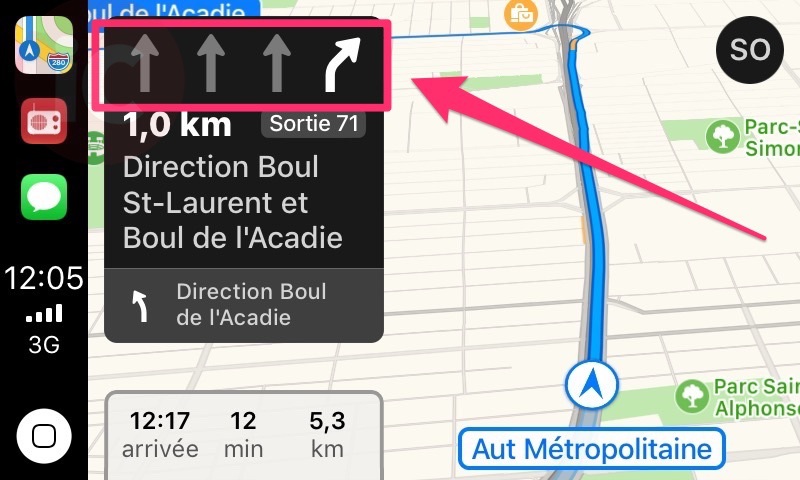
Now it appears Lane Guidance has expanded in Canada, as Apple has rolled out an update for the feature over-the-air. Numerous iPhone in Canada readers first started seeing Lane Guidance show up within navigation in Apple Maps as of last week.


According to one reader, Benoît, Lane Guidance was showing on Highway 15, north of Montréal. Speed limits were not showing yet.


Below is a screenshot of Lane Guidance shared by Benjamin, when he was “surprised” to see Lane Guidance markings show up within Apple Maps in CarPlay:

Apple Maps Lane Guidance Rolls Out in Canada for iOS 11 Users


Benjamin, like many other iOS users, hopes for Apple to let users choose Google Maps as the navigation option within CarPlay.


Apple has not updated their iOS 11 feature page to indicate Canada under Lane Guidance, so it’s unknown if this is a widespread rollout, or just being seen by a small number of users. As for Speed Limits within Apple Maps, only the UK and USA support the feature.


Are you seeing Lane Guidance within Apple Maps in iOS 11?


Source: iphoneincanada

Windows
Mac OS
iOS
Linux
3uTools
Win 64-bit For this device
V9.0 2025-11-11
Download
Win 32-bit For this device
V9.0 2025-11-11
Download
3uTools
Intel Chip How to Identify Chip Type
V9.0 2025-12-02
Download
Apple Chip
V9.0 2025-12-02
Download
How to Identify Chip Type
1.  Click the Apple icon in the top-left corner of the screen and select About This Mac.
2.  Check the Processor or Chip field to determine if it is "Intel" or "Apple".
Please use the 3uTools PC client to install the iOS client:
1、 Install either the Windows or Mac version of 3uTools on your computer
2、 Open the PC client and connect your device to the computer via USB cable
3、 After the connection is successful, wait for the computer to automatically install the mobile app for the device, or locate “Install Mobile App” on the computer and manually click to install.
3uTools
deb file
V3.01 2025-11-20
Download
rpm file
V3.01 2025-11-20
Download
Windows
Windows
iOS
iOS
Android
Android
TV
TV
3uAirPlayer
Win 64-bit For this device
V6.0.2 2025-11-19
Download
Win 32-bit For this device
V6.0.2 2025-11-19
Download
iOS Device Mirroring (No App Required)
1、 Install 3uAirPlayer on the Windows PC
2、 Open Control Center and select Screen Mirroring
3、 From the list, choose your PC to start mirroring
4、 Or connect your iOS device to the PC via USB to begin mirroring
Scan to get "3uAirPlayer" App
3uAirPlayer TV V1.0.18
2025-11-28
TV System Requirements: Android 7.0 or later
Download the TV installation package, copy it to a USB drive, insert it into your TV or set-top box, then select the file from the home screen to install.




