
NEWS

Video Shows 10-year-old Unlocking Mother's iPhone X via Face ID

11/15/2017

4772

We have reported Twins Using Face ID to Unlock iPhone X, now a video uploaded on Tuesday suggests that the Face ID system on Apple's iPhone X could be fooled not just by twins, but by any family member who bears enough resemblance.
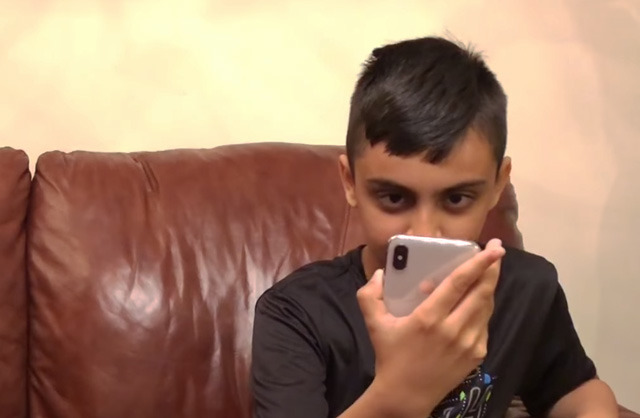

Video Shows 10-year-old Unlocking Mother's iPhone X via Face ID


In the the clip, a woman unlocks her phone using Face ID, locks it again, then hands it to her 10-year-old son. The son unlocks it on his first try.


In its current incarnation, Face ID is only able to store one face at a time, meaning that the iPhone made a false match between people of two different ages and sexes.


The technology is meant to adapt to changes in appearance, such as aging, makeup, and facial hair, as well as accessories like hats, scarves, and some sunglasses. That leniency could be what allows two family members to pass for each other, at least when they have a similar facial structure.


Shortly after the iPhone X's launch, it became common to test Face ID with identical twins. Sometimes it passed, other times not.


Source: appleinsider

Windows
Mac OS
iOS
Linux
3uTools
Win 64-bit For this device
V9.0 2025-11-11
Download
Win 32-bit For this device
V9.0 2025-11-11
Download
3uTools
Intel Chip How to Identify Chip Type
V9.0 2025-12-02
Download
Apple Chip
V9.0 2025-12-02
Download
How to Identify Chip Type
1.  Click the Apple icon in the top-left corner of the screen and select About This Mac.
2.  Check the Processor or Chip field to determine if it is "Intel" or "Apple".
Please use the 3uTools PC client to install the iOS client:
1、 Install either the Windows or Mac version of 3uTools on your computer
2、 Open the PC client and connect your device to the computer via USB cable
3、 After the connection is successful, wait for the computer to automatically install the mobile app for the device, or locate “Install Mobile App” on the computer and manually click to install.
3uTools
deb file
V3.01 2025-11-20
Download
rpm file
V3.01 2025-11-20
Download
Windows
Windows
iOS
iOS
Android
Android
TV
TV
3uAirPlayer
Win 64-bit For this device
V6.0.2 2025-11-19
Download
Win 32-bit For this device
V6.0.2 2025-11-19
Download
iOS Device Mirroring (No App Required)
1、 Install 3uAirPlayer on the Windows PC
2、 Open Control Center and select Screen Mirroring
3、 From the list, choose your PC to start mirroring
4、 Or connect your iOS device to the PC via USB to begin mirroring
Scan to get "3uAirPlayer" App
3uAirPlayer TV V1.0.18
2025-11-28
TV System Requirements: Android 7.0 or later
Download the TV installation package, copy it to a USB drive, insert it into your TV or set-top box, then select the file from the home screen to install.




