
NEWS

YouTube iOS App Causing Battery Drain, Overheating Issues for Some Users

11/14/2017

3480

YouTube has confirmed it is working to resolve a bug in its mobile app that causes significant battery drain on Apple devices, even when the app is running in the background. 

First covered by tech blog PiunikaWeb, the issue has been noted by several MacRumors forum members, as well as on Reddit and Twitter, and appears to be mainly affecting devices running iOS 11.1.1. 
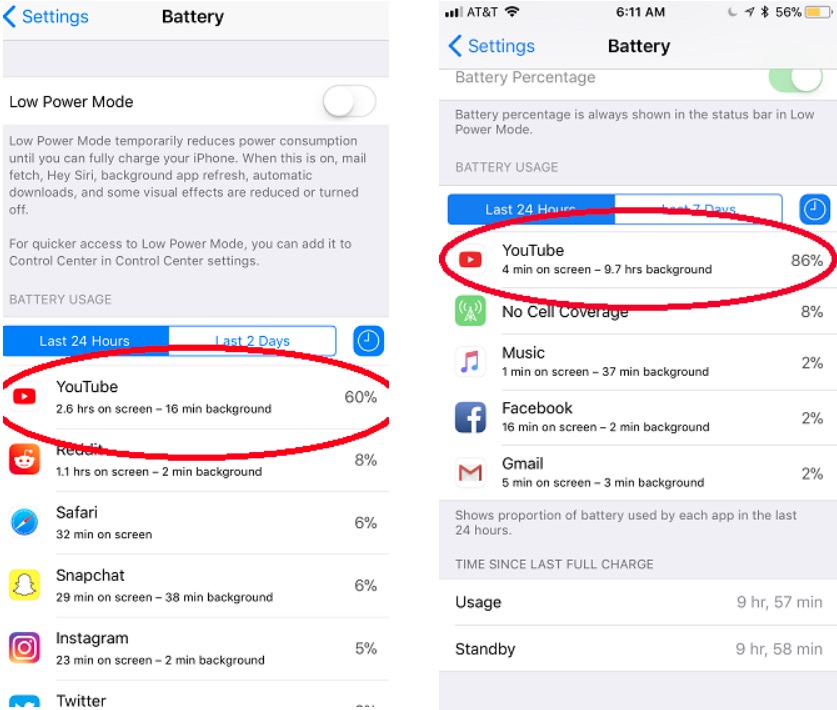
YouTube iOS App Causing Battery Drain, Overheating Issues for Some Users


In addition to battery drain, some iPhone users have reported that the YouTube app is causing their device to run much hotter than usual when watching videos, although the two issues don't seem to occur together in every case. 


YouTube says it is aware of the problem and is "actively working" to come up with a fix for the app, although no timeframe was given. In the meantime, affected users are advised to watch YouTube videos in their web browser of choice. 


Source: macrumors

Windows
Mac OS
iOS
Linux
3uTools
Win 64-bit For this device
V9.0 2025-11-11
Download
Win 32-bit For this device
V9.0 2025-11-11
Download
3uTools
Intel Chip How to Identify Chip Type
V9.0 2025-12-02
Download
Apple Chip
V9.0 2025-12-02
Download
How to Identify Chip Type
1.  Click the Apple icon in the top-left corner of the screen and select About This Mac.
2.  Check the Processor or Chip field to determine if it is "Intel" or "Apple".
Please use the 3uTools PC client to install the iOS client:
1、 Install either the Windows or Mac version of 3uTools on your computer
2、 Open the PC client and connect your device to the computer via USB cable
3、 After the connection is successful, wait for the computer to automatically install the mobile app for the device, or locate “Install Mobile App” on the computer and manually click to install.
3uTools
deb file
V3.01 2025-11-20
Download
rpm file
V3.01 2025-11-20
Download
Windows
Windows
iOS
iOS
Android
Android
TV
TV
3uAirPlayer
Win 64-bit For this device
V6.0.2 2025-11-19
Download
Win 32-bit For this device
V6.0.2 2025-11-19
Download
iOS Device Mirroring (No App Required)
1、 Install 3uAirPlayer on the Windows PC
2、 Open Control Center and select Screen Mirroring
3、 From the list, choose your PC to start mirroring
4、 Or connect your iOS device to the PC via USB to begin mirroring
Scan to get "3uAirPlayer" App
3uAirPlayer TV V1.0.18
2025-11-28
TV System Requirements: Android 7.0 or later
Download the TV installation package, copy it to a USB drive, insert it into your TV or set-top box, then select the file from the home screen to install.




