
NEWS

Vogue US Partners with Apple on Augmented-Reality Feature

11/13/2017

2522

American Vogue has joined forces with Apple to roll out an an augmented reality powered iPhone feature for iPhone X in a bid to integrate the magazine’s trend-driven content with tech.


Vogue is leveraging Apple’s ARKit technology to layer trends from the Spring/Summer 2018 season, such as a “21st-century spin on disco glamour”, over the user’s surroundings, creating an immersive image that can be downloaded or sent as a message.
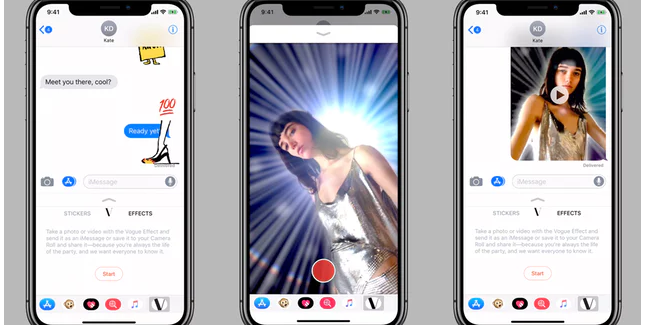

Vogue US Partners with Apple on Augmented-Reality Feature


“The Vogue Effect” iMessage extension uses the front-facing camera’s Face ID to create a multi-dimensional filter like those on Snapchat and Instagram. iPhone X users need to download Vogue’s app in order to access the filters, but it can be applied directly via iMessage once installed.


Arlie Sisson, vice president of emerging products at Condé Nast said: “This is experimentation, leveraging technology and pushing our creativity in new ways.It’s unexpected, but it makes sense because [leading] is what we do best."


The feature will be available exclusively on iPhone X on December 1.


Source: thedrum

Windows
Mac OS
iOS
Linux
3uTools
Win 64-bit For this device
V9.0 2025-11-11
Download
Win 32-bit For this device
V9.0 2025-11-11
Download
3uTools
Intel Chip How to Identify Chip Type
V9.0 2025-12-02
Download
Apple Chip
V9.0 2025-12-02
Download
How to Identify Chip Type
1.  Click the Apple icon in the top-left corner of the screen and select About This Mac.
2.  Check the Processor or Chip field to determine if it is "Intel" or "Apple".
Please use the 3uTools PC client to install the iOS client:
1、 Install either the Windows or Mac version of 3uTools on your computer
2、 Open the PC client and connect your device to the computer via USB cable
3、 After the connection is successful, wait for the computer to automatically install the mobile app for the device, or locate “Install Mobile App” on the computer and manually click to install.
3uTools
deb file
V3.01 2025-11-20
Download
rpm file
V3.01 2025-11-20
Download
Windows
Windows
iOS
iOS
Android
Android
TV
TV
3uAirPlayer
Win 64-bit For this device
V6.0.2 2025-11-19
Download
Win 32-bit For this device
V6.0.2 2025-11-19
Download
iOS Device Mirroring (No App Required)
1、 Install 3uAirPlayer on the Windows PC
2、 Open Control Center and select Screen Mirroring
3、 From the list, choose your PC to start mirroring
4、 Or connect your iOS device to the PC via USB to begin mirroring
Scan to get "3uAirPlayer" App
3uAirPlayer TV V1.0.18
2025-11-28
TV System Requirements: Android 7.0 or later
Download the TV installation package, copy it to a USB drive, insert it into your TV or set-top box, then select the file from the home screen to install.




