 NEWS
NEWS
This is How the iPhone X’s Face ID Views Your Face
 11/08/2017
 3978
3978
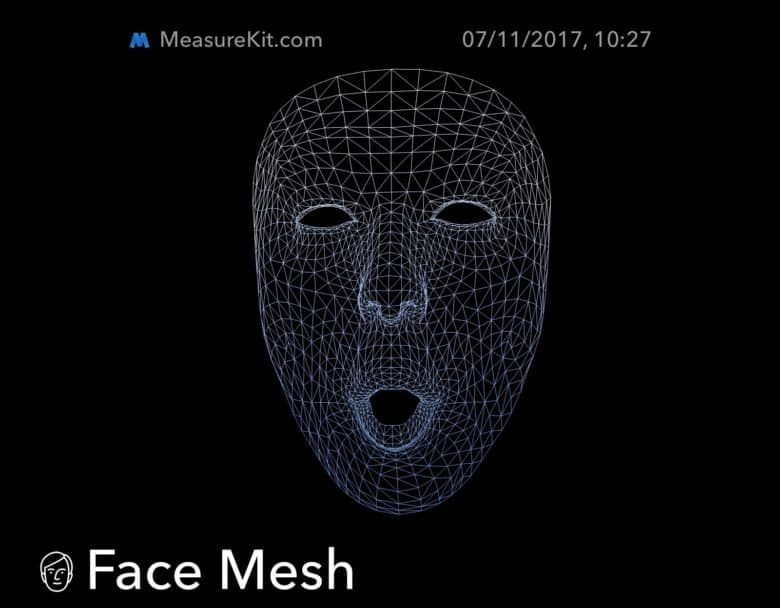
Did you ever wonder how Face ID sees you? After all, it has an incredibly complex set of eyes that project invisible dots onto your face, and then turns the results into a 3D representation of your head. If you want to know what that representation might look like, then check out the new Face Mesh tool in the latest update to MeasureKit, the AR measuring app.
Face Mesh
MeasureKit is already a great app that uses AR Kit to measure things in the real world. You just point the camera and tap the screen to stretch a virtual tape-measure between points.
The latest MeasureKit update uses the iPhone X’s Face ID camera to measure your face, and shows the data as a mesh grid, kind of like something from the world’s most mundane Tronremake. Everything you see comes from Apple’s officially-provided programming frameworks. “We are using SceneKit to draw the mesh, but all face data (including eyes) is provided by Apple and comes directly from ARKit,” writes MeasureKit developer Rinat Khanov.
The image at the top of this post comes from our own Killian Bell, making some kind of weird expression into his iPhone X’s self camera. But the really neat trick is video. Check out the demonstration video, from MeasureKit. Warning: it features possibly the most annoying music since the Crazy Frog.
Face ID’s Future
It may be an ultimately useless diversion, but the Face Mesh tool is a fantastic demo of just how well the Face ID camera tracks your head. If you can manage to look at that video with the sound turned up, you’ll see that you can even lip read the words sung by the mesh version of the woman as she joins in with the song.
Face ID is, by all accounts, a pretty magical piece of tech in that it just disappears, and is quickly forgotten about by most users. But the technology behind it is so impressive that it seems like there may be other good uses for it — we just don’t know what they are yet. Other than Tron Karaoke, of course.
Source: cult of mac










