 NEWS
NEWS
Apple Park Visitors Center Complete, Slated to Open Before End of 2017
 10/31/2017
 3051
3051
The visitor's center on the new Apple Park is complete, with a travel-oriented publication detailing the facility scheduled to open before the end of the year.
A recap of Apple Park's visitor center was published by Byways on Monday, and rounds up the key feature of the $108 million facility.
The Visitor Center has four main segments, with a retail store with assorted Apple-related paraphernalia, a cafe, an observation deck, and a space for an augmented reality experience about the Apple Park itself.
The augmented reality aspect is based around a scale model of Apple Park, and employees will hand visitors iPads with the software loaded on it. As visitors pan the iPad over the model, information about that particular building pops up.
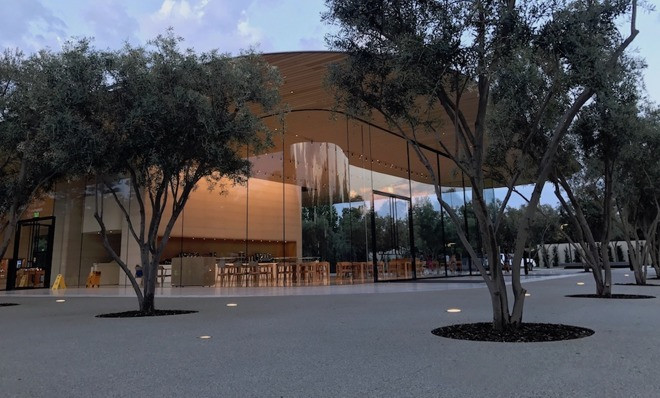
Company filings in the summer of 2015 described the visitor's center as a two-story facility with a 2,386-square-foot cafe and 10,114-square-foot store, topped by a carbon fiber roof and observation deck situated 23 feet above ground level, with 684 underground parking spaces. Apple planned to operating the new visitor center from 7 a.m. to 7 p.m. on weekdays and 9 a.m. to 7 p.m. on weekends.
Apple reportedly paid $4,000 per square foot for the building, more than double the $1,500 per square foot price tag for the overall project.
The visitor's center features solid glass walls with rounded corners, providing panoramic views into the central segment that appears similarly to the modern Apple Store, complete with a massive video wall. The south end of the building features a cafe with indoor seating facing a white expanse of surrounding paving suitable for outdoor seating.
Source: appleinsider










