 NEWS
NEWS
Googler Proves Any iPhone App with Camera Permission can Secretly Record you
 10/27/2017
 3078
3078
This is pretty disturbing. Google engineer Felix Krause has detailed an alarming privacy setting in Apple’s iOS that enables iPhone apps with camera permission to surreptitiously take photos and videos of you – without your knowledge.
Clarification: Krause has since contacted TNW to clarify that he conducts his security research work during off-hours and independently of Google.
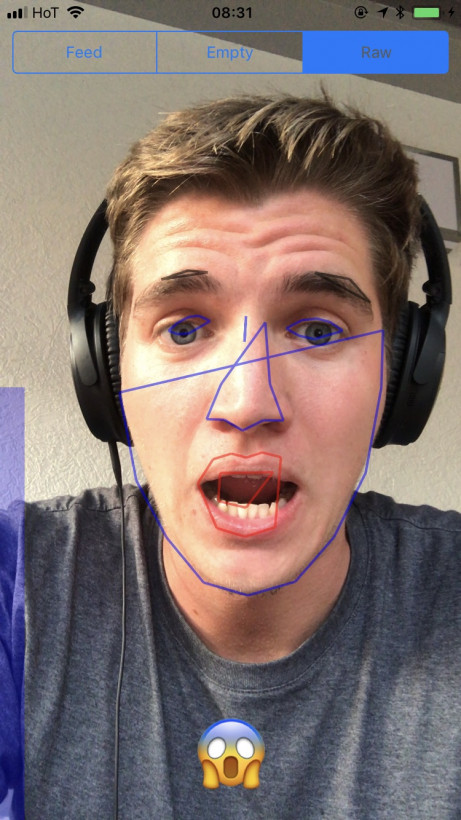
The researcher notes that granting camera permission will enable apps to access both the front and the back camera of your device, photograph and record you at any time the app is in the foreground, upload this content immediately, and run real-time face detection to read your facial expressions.
All of this without any notice or indication that your iPhone is snapping images of your face. No sound, no light, no LEDs.
Krause has shared a short demonstration of the documented issue on YouTube. Check it out below:
The most troubling concern here is that this is how this privacy setting is expected to work by design. Indeed, all signs seem to suggest this is yet another case of the trite “It’s a feature, not a bug” conundrum.
The most pressing issue is that anybody who chooses to exploit these permissions could scrape image data to locate users, find other existing photos of the device’s owner, and even watch you while you’re sitting on the toilet and livestream this spectacle for others to see.
Krause says there is little you can do to prevent this; though there are a few options, none of them would make for a particularly smooth and streamlined user experience.
One possibility is to equip your camera with covers. You can find numerous such accessories on Amazon. That, or you can revoke camera access for all apps – but not without sacrificing some app functionality in the meanwhile, like taking and sending photos straight from apps.
The Googler has since disclosed this complication to Apple. He also took a moment to offer some tips on how the Big A can handle this issue in a more responsible manner. One such solution, for example, would be to make camera permissions temporary – or at least add indicators to notify when the device is recording.
Interestingly, this marks yet another occasion in which Google discovers technical inconsistencies or vulnerabilities in competitors’ products. Over the past year, the Big G found critical bugs in antivirus software for Macs as well as glaring flaws in Microsoft’s Edge and Internet Explorer browsers.
Source: TNW










