
NEWS

Apple May Add "Jet White" Color Option for iPhone 7 and iPhone 7 Plus

11/08/2016

4905

Apple plans to add a "Jet White" color option for iPhone7 and iPhone 7 Plus models, according to Japanese website Mac Otakara. The report did not outline when Apple might add the sixth color to the lineup, and it also warned the information obtained from supply chain sources "may be unreliable." 
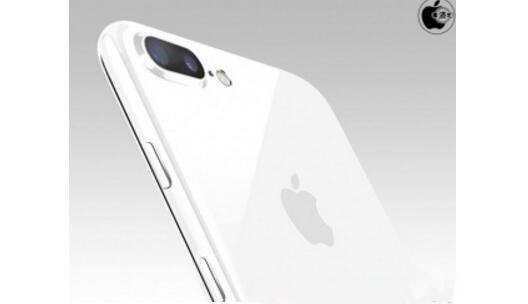

Apple May Add


Mac Otakara has accurately leaked information about Apple's upcoming plans in the past, including the new Jet Black color and no 3.5mm headphone jack on iPhone 7. It was also correct about several other iPhone 7 details, including its naming, flush Home button, longer earpiece cutout, and lack of Smart Connector.  

Nevertheless, the blog has been wrong on occasion, such as when it said the iPhone SE may come in a brighter pink shade that's different than Rose Gold. Moreover, given the lack of confidence in its own source, this rumor may not materialize and should be treated with a proverbial grain of salt.


Source:MacRumors

Windows
Mac OS
iOS
Linux
3uTools
Win 64-bit For this device
V9.0 2025-11-11
Download
Win 32-bit For this device
V9.0 2025-11-11
Download
3uTools
Intel Chip How to Identify Chip Type
V9.0 2025-12-02
Download
Apple Chip
V9.0 2025-12-02
Download
How to Identify Chip Type
1.  Click the Apple icon in the top-left corner of the screen and select About This Mac.
2.  Check the Processor or Chip field to determine if it is "Intel" or "Apple".
Please use the 3uTools PC client to install the iOS client:
1、 Install either the Windows or Mac version of 3uTools on your computer
2、 Open the PC client and connect your device to the computer via USB cable
3、 After the connection is successful, wait for the computer to automatically install the mobile app for the device, or locate “Install Mobile App” on the computer and manually click to install.
3uTools
deb file
V3.01 2025-11-20
Download
rpm file
V3.01 2025-11-20
Download
Windows
Windows
iOS
iOS
Android
Android
TV
TV
3uAirPlayer
Win 64-bit For this device
V6.0.2 2025-11-19
Download
Win 32-bit For this device
V6.0.2 2025-11-19
Download
iOS Device Mirroring (No App Required)
1、 Install 3uAirPlayer on the Windows PC
2、 Open Control Center and select Screen Mirroring
3、 From the list, choose your PC to start mirroring
4、 Or connect your iOS device to the PC via USB to begin mirroring
Scan to get "3uAirPlayer" App
3uAirPlayer TV V1.0.18
2025-11-28
TV System Requirements: Android 7.0 or later
Download the TV installation package, copy it to a USB drive, insert it into your TV or set-top box, then select the file from the home screen to install.




