 NEWS
NEWS
Apple Produces Half A Gallon of Fake Sweat Every day for Product Testing
 04/21/2017
 2923
2923
In addition to the tech it publicly releases, Apple invests in some pretty wacky technology most people never even hear about.
One example? The half-gallon of synthetic sweat Cupertino pumps out every single day to see how well its products withstand the day-to-day rigors of real-world use. Yes, really!
The intriguing tidbit was shared by Vice journalist Arielle Duhaime-Ross as part of an article exploring Apple’s environmental efforts.
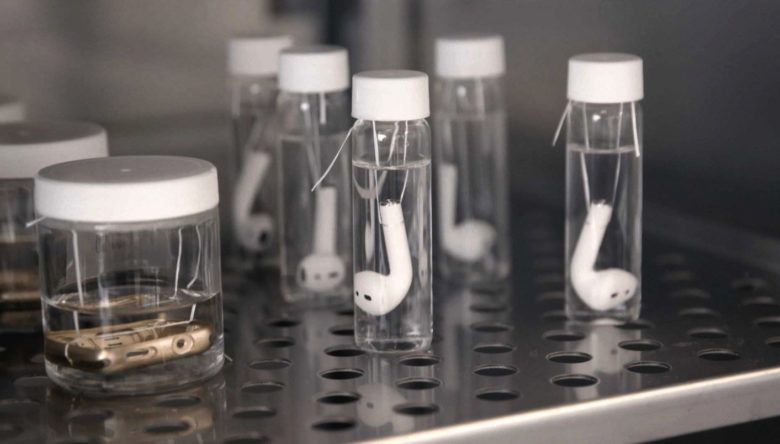
On Monday, Duhaime-Ross visited Apple HQ, where she was shown Apple Watch cases and AirPods placed in containers filled with synthetic human sweat to make sure they’re safe to wear over long periods of time.
Fun fact I learned on Monday @Apple HQ: a lab tech makes half a gallon of synthetic sweat EACH DAY to test products https://t.co/3ocKDgEqGC pic.twitter.com/P6G6Bw15ee
— Arielle Duhaime-Ross (@ArielleDRoss) April 19, 2017
Apple synthetic sweat testing
To be clear, Apple’s doing nothing fundamentally different here. Sweat testing is used in many, many different manufacturing sectors, ranging from jewelry and clothing to cosmetics, leather manufacturers and credit card companies.
Such tests allow companies to test products for possible harmful or unsightly corrosion, or to test the “colorfastness” of dyes and materials used in the production process.
There are even companies like Pickering Laboratories in Mountain View, California, that specialize in working out perfect formulas for synthetic sweat. What differs with Apple, as befits a company that has sold upward of 1 billion iPhones, is simply the mind-boggling scale that it’s carried out at.
We presume the job of whoever produces Apple’s synthetic sweat will find themselves even busier when Cupertino finally gets a sweat sensor working for a future Apple Watch…
Source: cult of mac









