
NEWS

Knife-waving Pair Rob Apple Store In Knox-Henderson

04/10/2017

3340

Police are seeking two knife-waving robbers who struck the Apple Store in Dallas' Knox-Henderson neighborhood this week.


The incident occurred around 4:20 p.m. Tuesday, when the two entered the Apple Store in the 3100 block of Knox Street and took multiple electronic items from the store while waving a knife at employees, police said.


The two are described as Latino males. The first, between 30 and 40 years old, is about 5-foot-8 and 240 pounds with a beard. He was wearing a black T-shirt with a U.S. Air Force emblem, along with black pants and brown shoes.
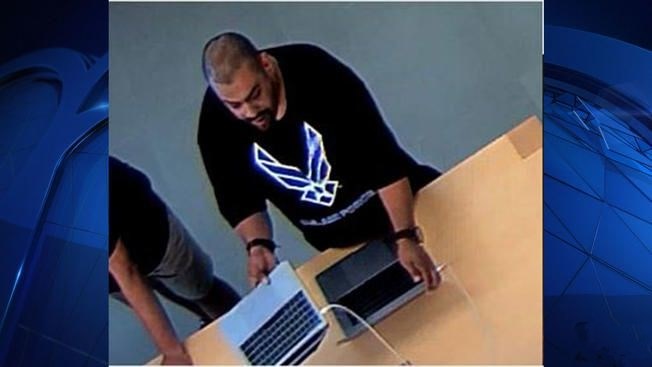

Knife-waving Pair Rob Apple Store In Knox-Henderson


The second, between 25 and 35, is about 5-foot-8 and 160 pounds. He was wearing a black hoodie, blue jeans and black tennis shoes.


They were last seen driving a silver 2009 or 2010 Nissan Altima four-door sedan.


Anyone with information is asked to called Dallas police Detective R. Richeson at 214-671-3602.


Source: dallasnews

Windows
Mac OS
iOS
Linux
3uTools
Win 64-bit For this device
V9.0 2025-11-11
Download
Win 32-bit For this device
V9.0 2025-11-11
Download
3uTools
Intel Chip How to Identify Chip Type
V9.0 2025-12-02
Download
Apple Silicon
V9.0 2025-12-02
Download
How to Identify Chip Type
1.  Click the Apple icon in the top-left corner of the screen and select About This Mac.
2.  Check the Processor or Chip field to determine if it is "Intel" or "Apple".
Please use the 3uTools PC client to install the iOS client:
1、 Install either the Windows or Mac version of 3uTools on your computer
2、 Open the PC client and connect your device to the computer via USB cable
3、 After the connection is successful, wait for the computer to automatically install the mobile app for the device, or locate “Install Mobile App” on the computer and manually click to install.
3uTools
deb file
V3.01 2025-11-20
Download
rpm file
V3.01 2025-11-20
Download
Windows
Windows
iOS
iOS
Android
Android
TV
TV
3uAirPlayer
Win 64-bit For this device
V6.0.2 2025-11-19
Download
Win 32-bit For this device
V6.0.2 2025-11-19
Download
iOS Device Mirroring (No App Required)
1、 Install 3uAirPlayer on the Windows PC
2、 Open Control Center and select Screen Mirroring
3、 From the list, choose your PC to start mirroring
4、 Or connect your iOS device to the PC via USB to begin mirroring
Scan to get "3uAirPlayer" App
3uAirPlayer TV V1.0.18
2025-11-28
TV System Requirements: Android 7.0 or later
Download the TV installation package, copy it to a USB drive, insert it into your TV or set-top box, then select the file from the home screen to install.




