NEWS

Apple's New Social Video Creation App 'Clips' Now Available for iPhone and iPad

04/07/2017

4453

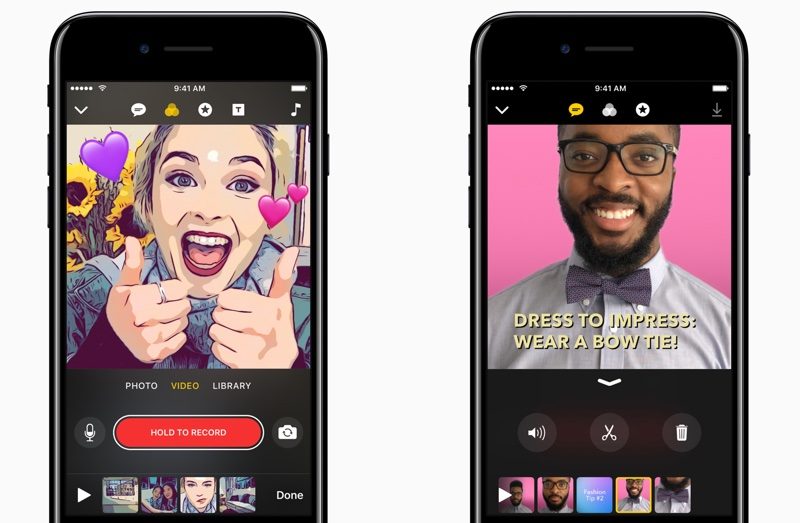
Apple today announced that its social video creation app "Clips," announced last month, will be available on the App Store for iPhone and iPad around 10:00 a.m. Pacific Time today, as reported by Engadget

Apple's New Social Video Creation App 'Clips' Now Available for iPhone and iPad
Clips lets users combine videos, images, and music into one seamless video that can then be shared through iMessage, Facebook, Instagram, YouTube, and elsewhere. Users can also create animated captions called "Live Titles" using only their voice, and apply effects such as comic book filters, speech bubbles, and shapes. 

Here's a quick hands-on video from Scott Stein at 
CNET


As noted by The Verge, clips have a familiar square format popularized by Instagram. Individual video clips up to 30 minutes in length can be combined to create up to an hour-long video shareable in 1080p HD.


Clips are created in a square format, and are added to a basic timeline at the bottom of the screen. You can add individual video clips up to 30 minutes long to this timeline; and the total run time of a finished Clips video can be as long as 60 minutes. It’s also created and shared in 1080p HD, if your source video is HD. This is the kind of stuff that makes it much more of a video creation app than a Snapchat competitor.


Update: Clips is now available on the App Store for both iPhone and iPad, but propagation issues may be temporarily causing the app to be listed as only available for iPad. Some users might have to try again later.


Source: macrumors


Windows
Mac OS
iOS
Linux
3uTools
Win 64-bit For this device
V9.0 2025-11-11
Download
Win 32-bit For this device
V9.0 2025-11-11
Download
3uTools
Intel Chip How to Identify Chip Type
V9.0 2025-12-02
Download
Apple Chip
V9.0 2025-12-02
Download
How to Identify Chip Type
1.  Click the Apple icon in the top-left corner of the screen and select About This Mac.
2.  Check the Processor or Chip field to determine if it is "Intel" or "Apple".
Please use the 3uTools PC client to install the iOS client:
1、 Install either the Windows or Mac version of 3uTools on your computer
2、 Open the PC client and connect your device to the computer via USB cable
3、 After the connection is successful, wait for the computer to automatically install the mobile app for the device, or locate “Install Mobile App” on the computer and manually click to install.
3uTools
deb file
V3.01 2025-11-20
Download
rpm file
V3.01 2025-11-20
Download
Windows
Windows
iOS
iOS
Android
Android
TV
TV
3uAirPlayer
Win 64-bit For this device
V6.0.2 2025-11-19
Download
Win 32-bit For this device
V6.0.2 2025-11-19
Download
iOS Device Mirroring (No App Required)
1、 Install 3uAirPlayer on the Windows PC
2、 Open Control Center and select Screen Mirroring
3、 From the list, choose your PC to start mirroring
4、 Or connect your iOS device to the PC via USB to begin mirroring
Scan to get "3uAirPlayer" App
3uAirPlayer TV V1.0.18
2025-11-28
TV System Requirements: Android 7.0 or later
Download the TV installation package, copy it to a USB drive, insert it into your TV or set-top box, then select the file from the home screen to install.