 NEWS
NEWS
Apple Watch Sleep Data Helps Harvard Researchers Study Menopause Transition
 05/29/2026
 297
297
Researchers at Harvard have published the results of a study that analyzed more than 94,000 nights of Apple Watch sleep data to better understand how sleep patterns change during perimenopause. Here are the details.
Study analyzed more than 94,000 nights of Apple Watch sleep data
For the past several years, Apple has used the Apple Watch as a way to support large-scale health studies through the Apple Research app.
That includes the Apple Women’s Health Study, the Apple Heart and Movement Study, and the Apple Hearing Study, which launched in 2019 with research partners including Harvard, Brigham and Women’s Hospital, the American Heart Association, and the University of Michigan.
In February 2025, Apple said those studies have since grown to more than 350,000 participants across the US.
Recently, the Harvard T.H. Chan School of Public Health published the results (via Aaron Perris) of a study that looked into how sleep patterns change during perimenopause.
The study used more than 94,000 nights of Apple Watch sleep data from 338 Apple Women’s Health Study participants aged 25 to 59, with the vast majority aged 45 to 59.
According to the data, “in the 12 months before and 12 months after the final logged menstrual period, many participants spent more time awake during the night.”
Additionally, the study also found that “in the 18 months leading up to menopause, 60% of women with sleep tracking data showed increased WASO (wake after sleep onset) relative to the previous 6 months,” with an average increase of 7%.
The researchers also noted that “in the 12 months before and 12 months after the last logged menstrual period, participants spent about 0.8% more of their sleep time awake after menopause compared to before.”
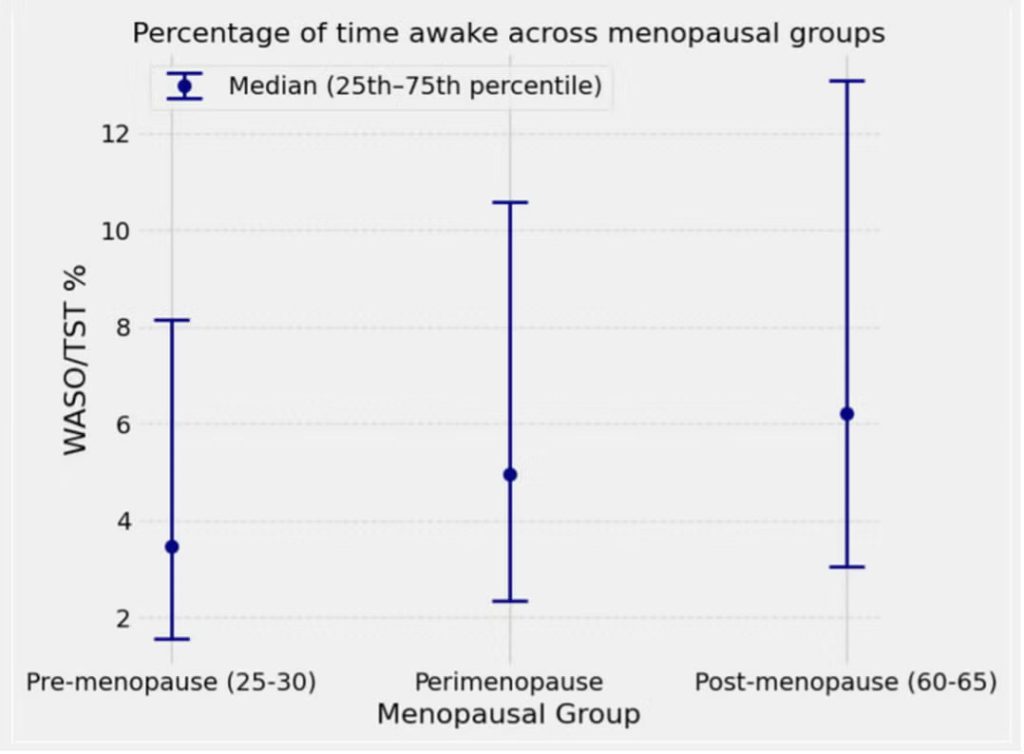
Importantly, the researchers emphasized that the results varied widely across participants, noting that “each person experiences perimenopause and menopause differently.”
Some participants had much larger increases in time awake after menopause, while others had no meaningful sleep change at all.
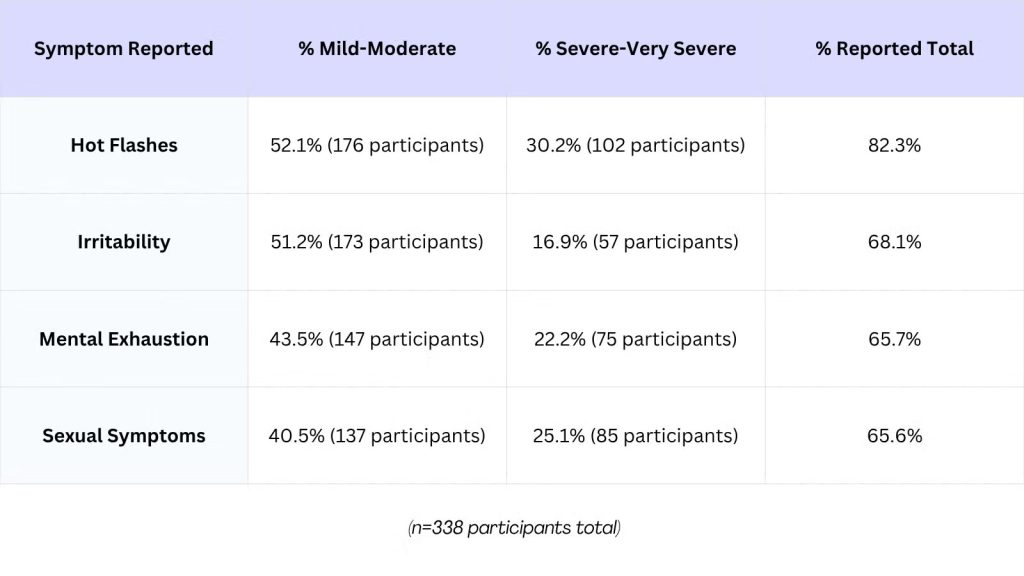
Finally, participants who were tracking their sleep for the study also logged other menopause symptoms, with hot flashes reported by 82.3%, irritability at 68.1%, mental exhaustion at 65.7%, and sexual symptoms at 65.6%.
For participants who reported more severe menopause symptoms, the symptoms most closely linked with worse sleep were bladder symptoms, joint symptoms, heart discomfort, and depressive symptoms.
The researchers also shared recommendations that can help women achieve better sleep during perimenopause, including:
- Maintaining a cool temperature in the sleeping environment
- Keeping a consistent sleep schedule
- Getting regular movement in
- Avoiding common bladder irritants and limiting fluids in the hours leading up to bedtime
- Prioritizing relaxation and mindfulness techniques in your bedtime routine.
Source: 9to5mac









