
NEWS

Apple Said to Cut iPhone Air Production Amid Underwhelming Sales

10/20/2025

4515

Apple plans to cut production of the iPhone Air amid underwhelming sales performance, Japan's Mizuho Securities believes (via The Elec).
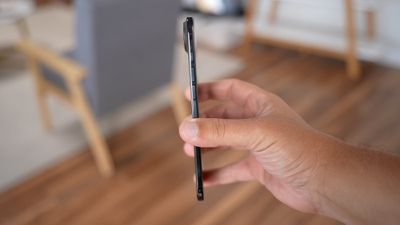
Apple Said to Cut iPhone Air Production Amid Underwhelming Sales
The Japanese investment banking and securities firm claims that the iPhone 17 Pro and ‌iPhone 17 Pro‌ Max are seeing higher sales than their predecessors during the same period last year, while the standard iPhone 17 is a major success, performing significantly better than the iPhone 16.

The ‌iPhone Air‌ is apparently the outlier; Apple plans to reduce production by one million units this year. Meanwhile, Apple plans to increase production of all other models by two million units. The overall production forecast of the ‌iPhone 17‌ series this year has also been increased from 88 million units to 94 million units for the start of 2026.

A separate report earlier today claimed that Samsung has canceled plans to release a successor to its own ‌iPhone Air‌ rival, the Galaxy S25 Edge, due to low sales. Nevertheless, the ‌iPhone Air‌ reportedly sold out within hours in China, despite lower than expected sales in western countries last month.

Source: Macrumors

Windows
Mac OS
iOS
Linux
3uTools
Win 64-bit For this device
V9.0 2025-11-11
Download
Win 32-bit For this device
V9.0 2025-11-11
Download
3uTools
Intel Chip How to Identify Chip Type
V9.0 2025-12-02
Download
Apple Chip
V9.0 2025-12-02
Download
How to Identify Chip Type
1.  Click the Apple icon in the top-left corner of the screen and select About This Mac.
2.  Check the Processor or Chip field to determine if it is "Intel" or "Apple".
Please use the 3uTools PC client to install the iOS client:
1、 Install either the Windows or Mac version of 3uTools on your computer
2、 Open the PC client and connect your device to the computer via USB cable
3、 After the connection is successful, wait for the computer to automatically install the mobile app for the device, or locate “Install Mobile App” on the computer and manually click to install.
3uTools
deb file
V3.01 2025-11-20
Download
rpm file
V3.01 2025-11-20
Download
Windows
Windows
iOS
iOS
Android
Android
TV
TV
3uAirPlayer
Win 64-bit For this device
V6.0.2 2025-11-19
Download
Win 32-bit For this device
V6.0.2 2025-11-19
Download
iOS Device Mirroring (No App Required)
1、 Install 3uAirPlayer on the Windows PC
2、 Open Control Center and select Screen Mirroring
3、 From the list, choose your PC to start mirroring
4、 Or connect your iOS device to the PC via USB to begin mirroring
Scan to get "3uAirPlayer" App
3uAirPlayer TV V1.0.18
2025-11-28
TV System Requirements: Android 7.0 or later
Download the TV installation package, copy it to a USB drive, insert it into your TV or set-top box, then select the file from the home screen to install.





