 NEWS
NEWS
Apple Arcade Adds Four More Games, Including Angry Birds Bounce
 07/04/2025
 778
778
Four more games were added to Apple Arcade today, including a new Angry Birds title.
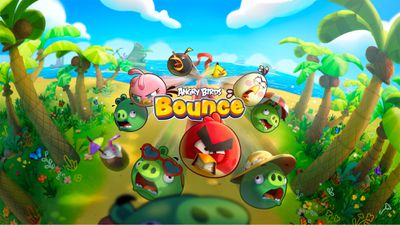
Angry Birds Bounce is a new take on the iconic Angry Birds game, which has received more than a billion downloads over the years. The new edition combines classic Angry Birds slingshot gameplay with arcade-style brick-breaker mechanics.
Here is how Apple describes Angry Birds Bounce:
Join Red, Chuck, Bomb, and the rest of the gang on a brand-new adventure. Angry Birds Bounce combines the classic charm of Angry Birds with an innovative arcade brick-breaker twist. When the pigs take over their islands, the birds must bounce back — literally — combining into powerful flocks and launching themselves to defeat an army of piggies and reclaim their home. With strategic rogue-lite gameplay, each level is a new challenge where players will master precision shots, unlock exciting power-ups, and build unique combos during each run.
The other three games added to Apple Arcade today:
- Kingdom Rush 5: Alliance TD+
- Suika Game+
- Crayola Scribble Scrubbie Pets+
More details about those games were outlined in Apple's announcement last month.
Apple Arcade is a subscription service that provides access to hundreds of games across the iPhone, iPad, Mac, Apple TV, and Apple Vision Pro. All of the games are free of ads and in-app purchases. In the U.S., Apple Arcade costs $6.99 per month, and it is bundled with other Apple services in all Apple One plans.
Apple Arcade can be accessed through the App Store and the new Apple Games app.
Source: Macrumors









