
NEWS

iPad Pro with Apple's 5G Modem, iPad 12, and More Already Rumored

03/31/2025

813

Bloomberg's Mark Gurman today shared some details about future devices.
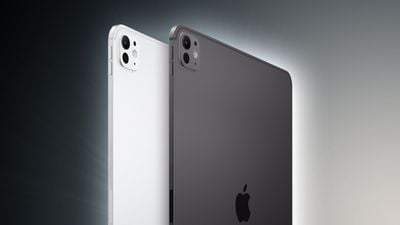
iPad Pro with Apple's 5G Modem, iPad 12, and More Already Rumored
In his Power On newsletter, Gurman said that Apple is already in the early stages of developing iPad Pro models with an M6 chip and an Apple-designed 5G modem, an entry-level iPad 12 with a newer chip, and MacBook Air models with an M5 chip.

Apple is currently aiming to release the iPad Pro models with its own 5G modem in 2027, according to Gurman. This will likely be Apple's C2 modem. The current cellular iPad Pro models are equipped with Qualcomm modems.

Apple's first C1 modem debuted in the iPhone 16e last month.

A new iPad Pro generation typically launches every 18 months or so. The current models were released in May 2024, and the next models with the M5 chip will likely launch in October this year. If this trend continues, the iPad Pro models with the M6 chip and an Apple-designed 5G modem would likely be released in the first half of 2027.

Gurman did not say when the new entry-level iPad and MacBook Air models will launch, but 2026 is a safe bet.

At this point, no other major changes have been rumored for these devices.

Source: Macrumors

Windows
Mac OS
iOS
Linux
3uTools
Win 64-bit For this device
V9.0 2025-11-11
Download
Win 32-bit For this device
V9.0 2025-11-11
Download
3uTools
Intel Chip How to Identify Chip Type
V9.0 2025-12-02
Download
Apple Silicon
V9.0 2025-12-02
Download
How to Identify Chip Type
1.  Click the Apple icon in the top-left corner of the screen and select About This Mac.
2.  Check the Processor or Chip field to determine if it is "Intel" or "Apple".
Please use the 3uTools PC client to install the iOS client:
1、 Install either the Windows or Mac version of 3uTools on your computer
2、 Open the PC client and connect your device to the computer via USB cable
3、 After the connection is successful, wait for the computer to automatically install the mobile app for the device, or locate “Install Mobile App” on the computer and manually click to install.
3uTools
deb file
V3.01 2025-11-20
Download
rpm file
V3.01 2025-11-20
Download
Windows
Windows
iOS
iOS
Android
Android
TV
TV
3uAirPlayer
Win 64-bit For this device
V6.0.2 2025-11-19
Download
Win 32-bit For this device
V6.0.2 2025-11-19
Download
iOS Device Mirroring (No App Required)
1、 Install 3uAirPlayer on the Windows PC
2、 Open Control Center and select Screen Mirroring
3、 From the list, choose your PC to start mirroring
4、 Or connect your iOS device to the PC via USB to begin mirroring
Scan to get "3uAirPlayer" App
3uAirPlayer TV V1.0.18
2025-11-28
TV System Requirements: Android 7.0 or later
Download the TV installation package, copy it to a USB drive, insert it into your TV or set-top box, then select the file from the home screen to install.




