 NEWS
NEWS
iPhone 15 Pro to Get Visual Intelligence in Future Update, Likely iOS 18.4
 02/21/2025
 1874
1874
Apple's new iPhone 16e, announced on Wednesday, supports Visual Intelligence despite having no Camera Control button, and now Apple has confirmed that the Apple Intelligence feature is coming to the iPhone 15 Pro as well in a future software update.
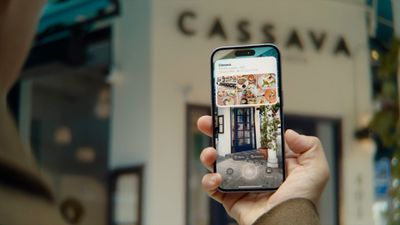
On iPhone 16 models, Visual Intelligence lets you use the camera to learn more about places and objects around you. It can also summarize text, read text out loud, translate text, search Google for items, ask ChatGPT, and more.
The feature is activated via the Camera Control button that's exclusive to iPhone 16 models. It was thought that the extra button was necessary to activate the feature, but the new iPhone 16e lacks such a button. Instead, Visual Intelligence can be assigned to the device's Action button or enabled via Control Center.
Now, Apple has told Daring Fireball's John Gruber that Visual Intelligence is coming to the iPhone 15 Pro "in a future software update." Like the iPhone 16e, the iPhone 15 Pro doesn't have a Camera Control button, but Apple says the function will be able to be launched in the Control Center interface or via the Action button once the update drops.
Apple would not confirm whether the update in question is iOS 18.4, beta releases for which are expected any day now. But given that the iPhone 16e will become available to buy on February 28, iOS 18.4 seems like the most likely update that will bring Visual Intelligence to the iPhone 15 Pro. Following yesterday's debut of the iPhone 16e, Apple updated its website to indicate that iOS 18.4 will be released publicly in early April.
Source: Macrumors









