 NEWS
NEWS
iPhone Was the Most Popular Smartphone in Q4 2021
 01/19/2022
 2012
2012
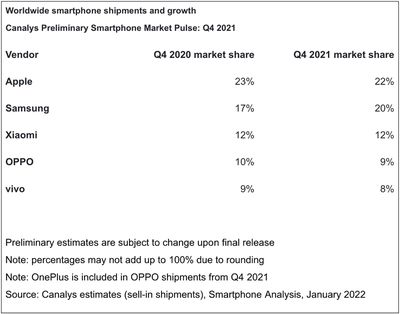
iPhones accounted for around one-fifth of all smartphone shipments in the fourth quarter of 2021, allowing Apple to reclaim first place as the biggest smartphone vendor, according to a report from Canalys.
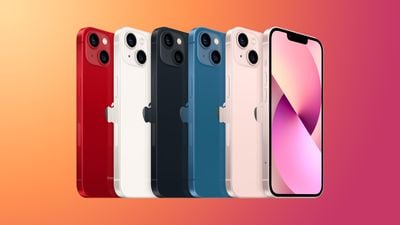
Canalys estimates that the iPhone accounted for 22 percent of worldwide smartphone shipments in the fourth quarter of 2021. The scale of Apple's shipments is thanks to strong demand for the iPhone 13 lineup, which launched in September last year. Canalys analyst Sanyam Chaurasia said:
Apple is back at the top of the smartphone market after three quarters, driven by a stellar performance from the iPhone 13. Apple saw unprecedented iPhone performance in Mainland China, with aggressive pricing for its flagship devices keeping the value proposition strong. Apple's supply chain is starting to recover, but it was still forced to cut production in Q4 amid shortages of key components and could not make enough iPhones to meet demand. In prioritized markets, it maintained adequate delivery times, but in some markets its customers had to wait to get their hands on the latest iPhones.
Apple reclaimed first place from Samsung, which had reigned as the top smartphone vendor in the previous quarter. Samsung fell slightly short of Apple's shipments with a market share of 20 percent. Xiaomi retained its third-place position with 12 percent share of shipments.
Overall smartphone shipments grew just one percent globally due to supply chain issues, but supply chain disruption primarily affected low-end vendors rather than titans such as Apple. Canalys also noted that it may be several years before component manufacturers are able to sufficiently increase their production capacity to meet demand. Industry bottlenecks are not expected to ease until the second half of 2022.
While supply chain constraints cost Apple $6 billion in the fourth fiscal quarter of 2021, the company's supply chain is now firmly recovering as it prepares for a slate of new product launches this year.
Source: Macrumors









