NEWS

Apple Patents Envision MacBook That Wirelessly Charges iPhone, iPad and Watch

01/06/2021

2376

Apple Patents Envision MacBook That Wirelessly Charges iPhone, iPad and Watch


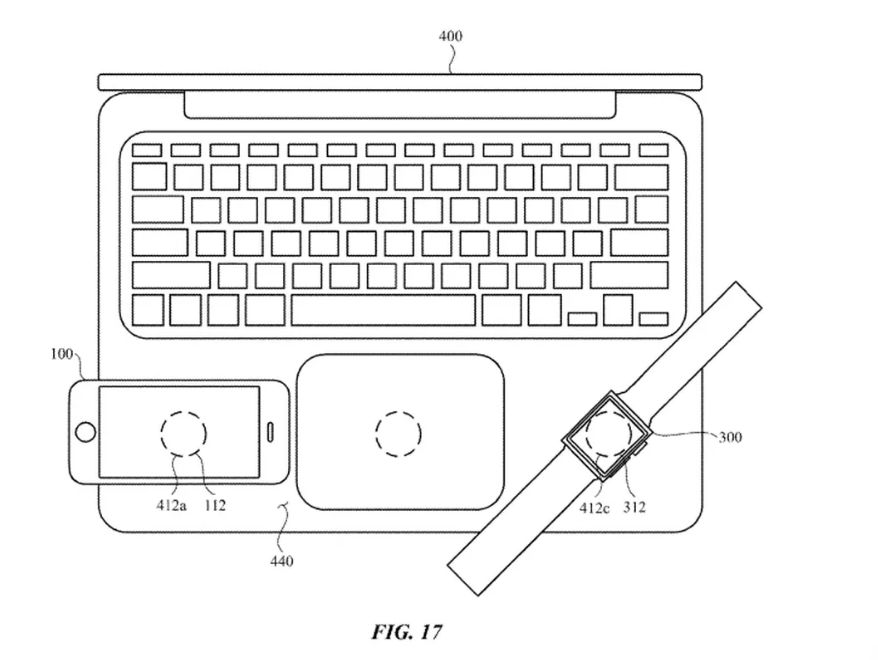
Apple could be looking to someday build a MacBook that wirelessly charges other devices such as an iPhone, iPad or Apple Watch, according to newly granted patents for two-way charging, Patently Apple reported Tuesday. Attached images illustrate the placement of several inductive charging coils placed under the frame of the laptop that allow users to charge multiple devices at once.


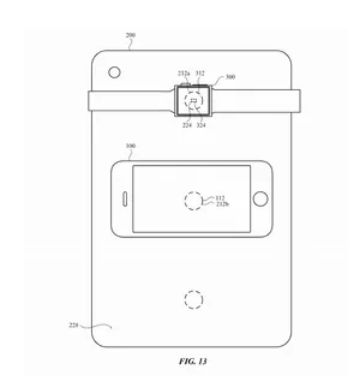
The patents also include an image of an iPad charging an iPhone and Apple Watch.


Apple writes that the addition of wireless charging could be particularly helpful when people don't want to or aren't able to track down separate power supplies for various gadgets. Samsung allows you to wirelessly charge your devices off the back of some Galaxy phones via the wireless Qi standard.

Apple Patents Envision MacBook That Wirelessly Charges iPhone, iPad and Watch


Apple is envisioning wireless charging in the iPad, too.

US Patent and Trademark Office

The iPhone maker's patents don't guarantee something like this would become a reality. This comes after Apple canceled its AirPower wireless charging mat project in 2019, saying the product didn't meet its standards.


Apple didn't immediately respond to a request for comment. 


Source: CNET

Windows
Mac OS
iOS
Linux
3uTools
Win 64-bit For this device
V9.0 2025-11-11
Download
Win 32-bit For this device
V9.0 2025-11-11
Download
3uTools
Intel Chip How to Identify Chip Type
V9.0 2025-12-02
Download
Apple Chip
V9.0 2025-12-02
Download
How to Identify Chip Type
1.  Click the Apple icon in the top-left corner of the screen and select About This Mac.
2.  Check the Processor or Chip field to determine if it is "Intel" or "Apple".
Please use the 3uTools PC client to install the iOS client:
1、 Install either the Windows or Mac version of 3uTools on your computer
2、 Open the PC client and connect your device to the computer via USB cable
3、 After the connection is successful, wait for the computer to automatically install the mobile app for the device, or locate “Install Mobile App” on the computer and manually click to install.
3uTools
deb file
V3.01 2025-11-20
Download
rpm file
V3.01 2025-11-20
Download
Windows
Windows
iOS
iOS
Android
Android
TV
TV
3uAirPlayer
Win 64-bit For this device
V6.0.2 2025-11-19
Download
Win 32-bit For this device
V6.0.2 2025-11-19
Download
iOS Device Mirroring (No App Required)
1、 Install 3uAirPlayer on the Windows PC
2、 Open Control Center and select Screen Mirroring
3、 From the list, choose your PC to start mirroring
4、 Or connect your iOS device to the PC via USB to begin mirroring
Scan to get "3uAirPlayer" App
3uAirPlayer TV V1.0.18
2025-11-28
TV System Requirements: Android 7.0 or later
Download the TV installation package, copy it to a USB drive, insert it into your TV or set-top box, then select the file from the home screen to install.