NEWS

Apple Maps Adding Public Transit Directions in Austria

11/25/2020

2110

Apple Maps Adding Public Transit Directions in Austria


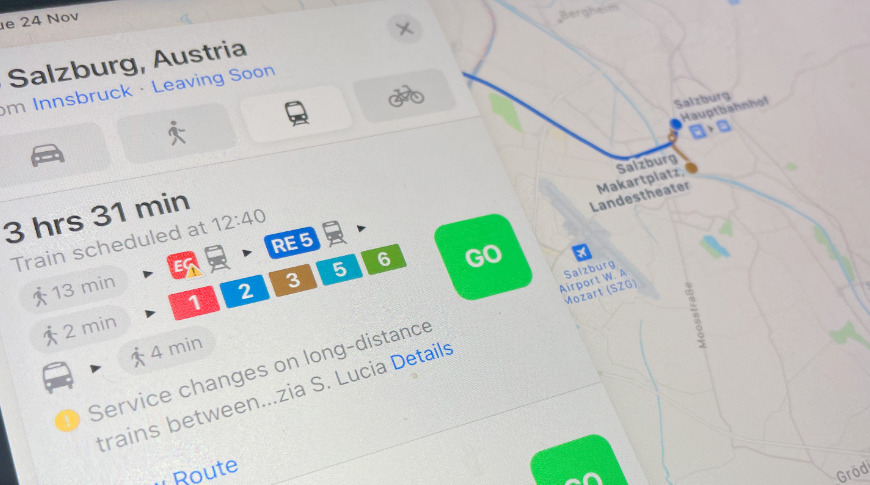
Apple Maps users in Austria say that transit directions are starting to appear, though as yet they do not cover all public transport.


Continuing its expansion of Apple Maps features, which recently saw improvements for Portugal and also the UK, Apple has seemingly begun rolling out public transit directions in Austria.


According to readers of iPhone-ticker.de, so far only major routes appear to have timetables, however, and Apple has yet to formally announce the improvement.


Apple only occasionally announces individual country improvements, and instead just typically updates its complete list of Apple Maps feature availability. Even then, it only quite slowly updates that list, so it's most likely that the feature is steadily rolling out for all routes in Austria.


The improved transit directions for Austria follows Apple's adding this detail for other major European countries, such as France, Spain, and Germany, in 2020. Apple has stated that Europe is its focus after having completed transit details for the US.


Source: Appleinsider

Windows
Mac OS
iOS
Linux
3uTools
Win 64-bit For this device
V9.0 2025-11-11
Download
Win 32-bit For this device
V9.0 2025-11-11
Download
3uTools
Intel Chip How to Identify Chip Type
V9.0 2025-12-02
Download
Apple Chip
V9.0 2025-12-02
Download
How to Identify Chip Type
1.  Click the Apple icon in the top-left corner of the screen and select About This Mac.
2.  Check the Processor or Chip field to determine if it is "Intel" or "Apple".
Please use the 3uTools PC client to install the iOS client:
1、 Install either the Windows or Mac version of 3uTools on your computer
2、 Open the PC client and connect your device to the computer via USB cable
3、 After the connection is successful, wait for the computer to automatically install the mobile app for the device, or locate “Install Mobile App” on the computer and manually click to install.
3uTools
deb file
V3.01 2025-11-20
Download
rpm file
V3.01 2025-11-20
Download
Windows
Windows
iOS
iOS
Android
Android
TV
TV
3uAirPlayer
Win 64-bit For this device
V6.0.2 2025-11-19
Download
Win 32-bit For this device
V6.0.2 2025-11-19
Download
iOS Device Mirroring (No App Required)
1、 Install 3uAirPlayer on the Windows PC
2、 Open Control Center and select Screen Mirroring
3、 From the list, choose your PC to start mirroring
4、 Or connect your iOS device to the PC via USB to begin mirroring
Scan to get "3uAirPlayer" App
3uAirPlayer TV V1.0.18
2025-11-28
TV System Requirements: Android 7.0 or later
Download the TV installation package, copy it to a USB drive, insert it into your TV or set-top box, then select the file from the home screen to install.