NEWS

Apple’s new 10.2-inch iPad Begins Shipping Tomorrow

09/25/2019

2358

Apple’s new 10.2-inch iPad Begins Shipping Tomorrow


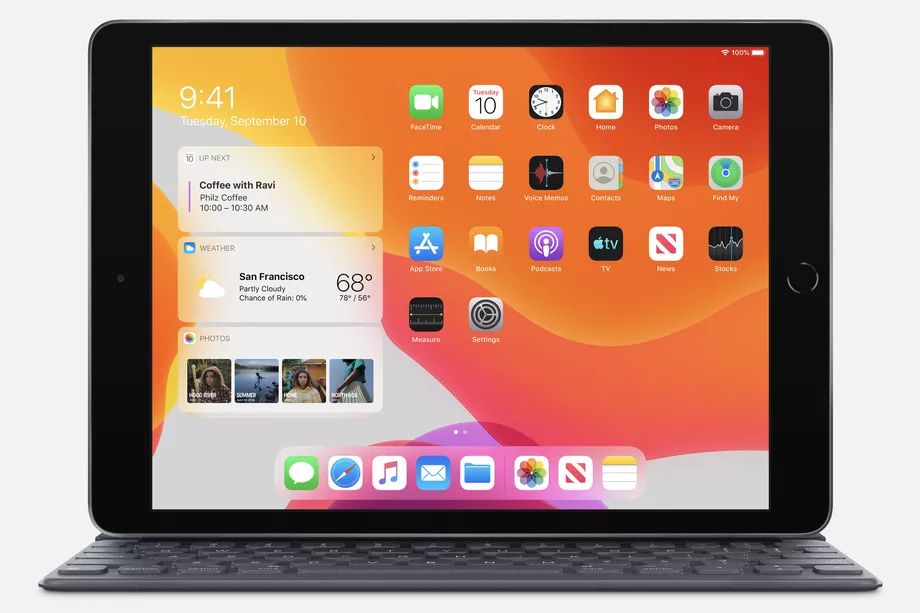
The new entry-level iPad, now with a 10.2-inch display, will start shipping out tomorrow. In a press release coinciding with the release of iPadOS, Apple noted that the iPad will also be available at the company’s retail stores later this week. Apple had previously indicated a September 30th release date, so this is slightly earlier than expected — just like the moved-up launch of iPadOS and iOS 13.1. The seventh-gen iPad starts at $329 for Wi-Fi models or $499 for those including cellular data. Education customers can get it for $299.


Aside from increasing its screen size from the old, original 9.7-inch display, Apple’s new iPad includes a Smart Connector for compatibility with the same Smart Keyboard used by the iPad Air. It retains Apple Pencil support and is powered by the A10 Fusion chip. The display lacks Apple’s True Tone feature for optimizing white balance depending on your environment, however. And it’s still not laminated to the front glass like other, more expensive iPads, so the air gap remains. But at $329, it should nonetheless prove plenty good for many people. Apple says the entry-level iPad remains the most popular choice in the whole lineup.


The new iPad runs iPadOS, with improved multitasking capabilities, a new home screen that displays more apps, and “desktop-class” web browsing in Safari, among many other new features.


Source: The Verge

Windows
Mac OS
iOS
Linux
3uTools
Win 64-bit For this device
V9.01 2025-12-27
Download
Win 32-bit For this device
V9.01 2025-12-27
Download
3uTools
Intel Chip How to Identify Chip Type
V9.0 2025-12-02
Download
Apple Silicon
V9.0 2025-12-02
Download
How to Identify Chip Type
1.  Click the Apple icon in the top-left corner of the screen and select About This Mac.
2.  Check the Processor or Chip field to determine if it is "Intel" or "Apple".
Please use the 3uTools PC client to install the iOS client:
1、 Install either the Windows or Mac version of 3uTools on your computer
2、 Open the PC client and connect your device to the computer via USB cable
3、 After the connection is successful, wait for the computer to automatically install the mobile app for the device, or locate “Install Mobile App” on the computer and manually click to install.
3uTools
deb file
V3.01 2025-11-20
Download
rpm file
V3.01 2025-11-20
Download
Windows
Windows
iOS
iOS
Android
Android
TV
TV
3uAirPlayer
Win 64-bit For this device
V6.0.2 2025-11-19
Download
Win 32-bit For this device
V6.0.2 2025-11-19
Download
iOS Device Mirroring (No App Required)
1、 Install 3uAirPlayer on the Windows PC
2、 Open Control Center and select Screen Mirroring
3、 From the list, choose your PC to start mirroring
4、 Or connect your iOS device to the PC via USB to begin mirroring
Scan to get "3uAirPlayer" App
3uAirPlayer TV V1.0.18
2025-11-28
TV System Requirements: Android 7.0 or later
Download the TV installation package, copy it to a USB drive, insert it into your TV or set-top box, then select the file from the home screen to install.