NEWS

Apple Will Manufacture Its New Mac Pro in Texas

09/24/2019

2487

Apple Will Manufacture Its New Mac Pro in Texas


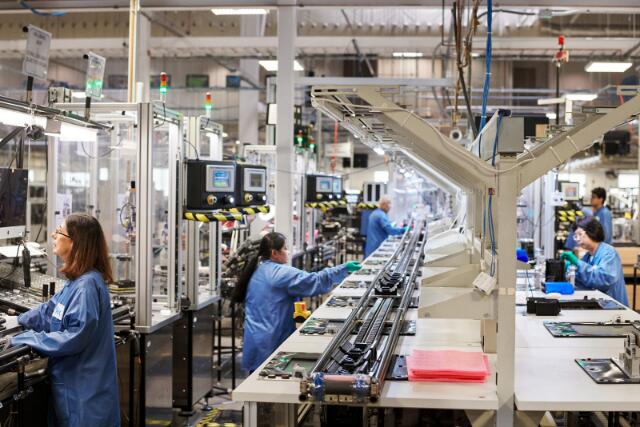
Apple hinted that it wanted to manufacture the redesigned Mac Pro in Texas, and now it's official. The company has confirmed that it'll assemble the workstation at the same Austin, Texas plant that has produced the cylindrical Mac Pro since 2013. The company isn't shy about the reason for the move: it's reportedly enabled by exemptions from Trump's China tariffs for "certain necessary components" in the system. Production starts "soon."


Apple had received 10 out of its 15 requested exemptions for components like partial circuit boards. While Apple has a network of US suppliers for its products, many of the parts for computers (and those of rivals) are still made in China -- the company wouldn't have seen much benefit from US assembly if it had to pay a premium for some of the Mac Pro's key ingredients.


CEO Tim Cook (who hinted at this possibility in July) touted this as part of Apple's existing commitment to American jobs, including its recent investment into Corning. However, it's not necessarily the coup it sounds like at first blush. Apple can produce the Mac Pro stateside due to both its low volume (few people will buy a $6,000 tower for home use) and the high levels of automation at the Austin plant. This won't lead to an abundance of new jobs, and it may still be more practical to make high-volume products like iPhones and MacBooks in China even if future tariffs cut into Apple's profit margins.


Source: engadget

Windows
Mac OS
iOS
Linux
3uTools
Win 64-bit For this device
V9.0 2025-11-11
Download
Win 32-bit For this device
V9.0 2025-11-11
Download
3uTools
Intel Chip How to Identify Chip Type
V9.0 2025-12-02
Download
Apple Silicon
V9.0 2025-12-02
Download
How to Identify Chip Type
1.  Click the Apple icon in the top-left corner of the screen and select About This Mac.
2.  Check the Processor or Chip field to determine if it is "Intel" or "Apple".
Please use the 3uTools PC client to install the iOS client:
1、 Install either the Windows or Mac version of 3uTools on your computer
2、 Open the PC client and connect your device to the computer via USB cable
3、 After the connection is successful, wait for the computer to automatically install the mobile app for the device, or locate “Install Mobile App” on the computer and manually click to install.
3uTools
deb file
V3.01 2025-11-20
Download
rpm file
V3.01 2025-11-20
Download
Windows
Windows
iOS
iOS
Android
Android
TV
TV
3uAirPlayer
Win 64-bit For this device
V6.0.2 2025-11-19
Download
Win 32-bit For this device
V6.0.2 2025-11-19
Download
iOS Device Mirroring (No App Required)
1、 Install 3uAirPlayer on the Windows PC
2、 Open Control Center and select Screen Mirroring
3、 From the list, choose your PC to start mirroring
4、 Or connect your iOS device to the PC via USB to begin mirroring
Scan to get "3uAirPlayer" App
3uAirPlayer TV V1.0.18
2025-11-28
TV System Requirements: Android 7.0 or later
Download the TV installation package, copy it to a USB drive, insert it into your TV or set-top box, then select the file from the home screen to install.