 NEWS
NEWS
iPhone 11 Pro Max Hardware Points to Latent Bilateral Charging Functionality
 09/23/2019
 3777
3777
In its obligatory launch day teardown of iPhone 11 Pro Max on Friday, repair expert iFixit discovered two connectors leading to the handset's battery, a new hardware configuration that could support claims of a deactivated bilateral wireless charging feature.
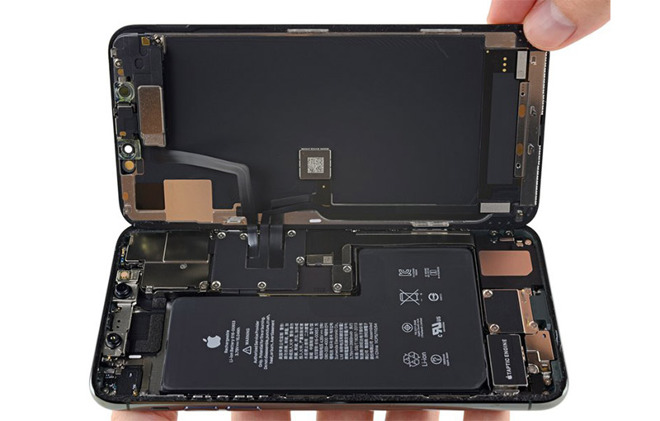
According to the repair firm, iPhone 11 Pro Max's L-shaped battery includes a pair of connectors running to the Lightning charging port and the main logic board, respectively. The new setup could hint at a bilateral wireless charging feature that was rumored to launch with the handset.
In testing the mechanics of the connectors, iFixit found iPhone is able to function and recharge via the Lightning port while the battery connector leading to said Lightning port is disconnected. Wireless charging was disabled, suggesting the cable is a direct line to iPhone's charging coils.
Further, reconnecting the cable temporarily triggered a temperature warning iFixit believes is the result of a loss of contact between the logic board and a critical battery temperature sensor. If true, the design could reveal a currently unused heat management circuit potentially reserved for bilateral wireless charging.
Removing the second battery cable, which connects to iPhone's logic board, expectedly resulted in a complete system shutdown.
While not confirmed, today's tests point to the presence of wireless charging functionality that currently lies dormant in all new iPhone Pro Max models. What is now known, however, is Apple's incorporation of new hardware in iPhone 11 Pro Max, and likely iPhone 11 Pro, without word of significant updates to its wireless charging capabilities; the latest iPhone recharges at the same speed and with the same efficiency as prior models.
Rumors leading up to iPhone 11's unveiling suggested Apple was working on a bilateral charging feature that would enable users to charge a second device, like AirPods or perhaps another Qi-compatible smartphone, using iPhone's internal charging coils. Those rumblings were echoed by multiple industry insiders and persisted until a last-minute prediction from analyst Ming-Chi Kuo pegged Apple to abandon the feature because the system failed reach adequate operating efficiencies.
With the hardware seemingly in place, it is possible that Apple will enable bilateral charging in a future iOS update. Whether the company is able to overcome whatever hurdles kept the feature from going live at launch through software is unknown.
Update: iFixit's teardown also revealed an unidentified circuit board nestled beneath the battery that could be tied to Apple's rumored bilateral charging feature.
Further, blogger Rene Ritchie claims iPhone 11 contains no bilateral charging hardware as the feature was never planned to go into production.
Source: AppleInsider










