 NEWS
NEWS
'Apple, Pay your Taxes!': Protest Greets US Tech giant's Champs-Élysées Launch
 11/20/2018
 3589
3589
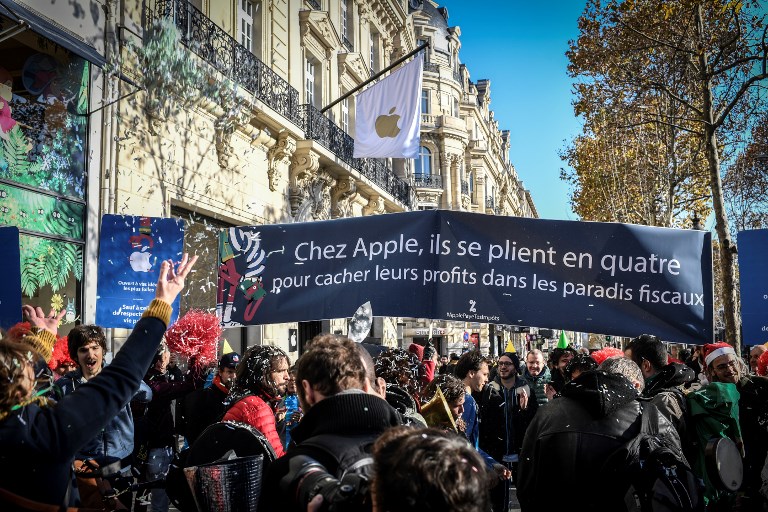
The launch of an Apple store on the Champs Elysees in Paris was greeted Sunday by a protest against the US multinational's controversial fiscal practices.
Activists from the tax campaign group Attac gathered on the celebrated boulevard, wearing coloured wigs and party hats, throwing confetti and chanting: "Apple, pay your taxes!"
The group had staged a sit-in at Apple's flagship Paris store in December 2017, and in February a French court declined to approve a ban on such actions following a request by the US computer giant.
"We have come to celebrate in our own way the inauguration of Apple's Champs Elysees store, to remind people that Apple is one of the biggest tax evaders in the world," Attac spokeswoman Aurelie Trouve told AFP at the protest, which featured a brass band.
Apple, the first US company to attain one trillion dollars in market capitalisation, grew in part owing "to the fact that it extorts billions of euros from citizens, notably European and French, through fiscal evasion of its profits, first in Ireland and now in Jersey," the spokeswoman said.
Meanwhile security personnel allowed customers to enter the new store to a boisterous welcome by Apple employees.
Attac -- the Association for the Taxation of Financial Transactions and Citizens Action -- criticises French President Emmanuel Macron for failing to tackle multinational tax practices.
French Economy Minister Bruno Le Maire has pushed for a Europe-wide tax policy on computer giants such as Google, Amazon, Facebook and Apple but Ireland, which attracts such companies, is opposed while EU heavyweight Germany has voiced only lukewarm support for the French initiative.
Source: the local









