 NEWS
NEWS
Apple Shares Details on Planned Tower Theatre Flagship Store in Los Angeles
 08/03/2018
 3776
3776
Apple has long been rumored to be working on plans for an Apple Store at the iconic Tower Theatre in Los Angeles, and today, Apple shared details on the upcoming location with the Los Angeles Times.
According to Apple, the Tower Theatre store will be one of the world's most prominent Apple retail locations when it is completed, with the company planning to entirely overhaul the interior of the building to turn it into retail space and an interactive community area.
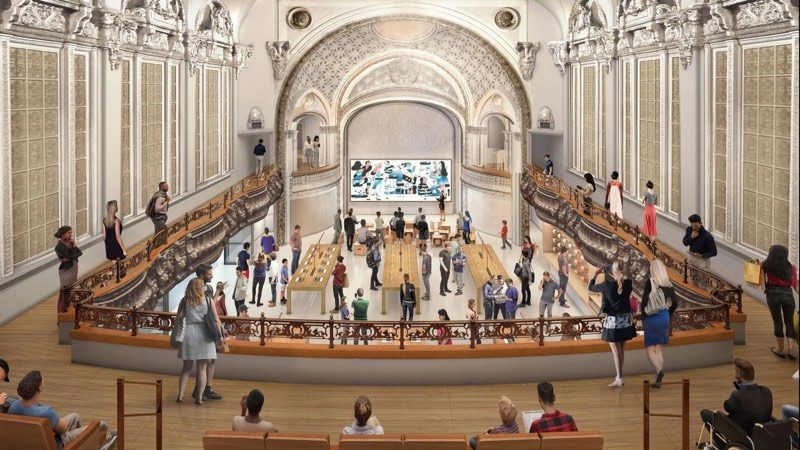
In a rendering shared by Apple, the Tower Theatre store preserves the ornate Renaissance Revival style of the interior of the theatre for an Apple Store that will indeed be one of the most unique. The building, which features French, Spanish, Moorish, and Italian elements, was built to mimic the Paris Opera House.
The Tower Theatre is in disrepair, though, and the area around it has become outdated, leaving the building's owners and city council members eager for Apple's revitalization efforts. Apple is using the original Tower Theatre blueprints and photographs to restore original theatre elements like murals, decorations, and the leaded-glass window over the entrance.
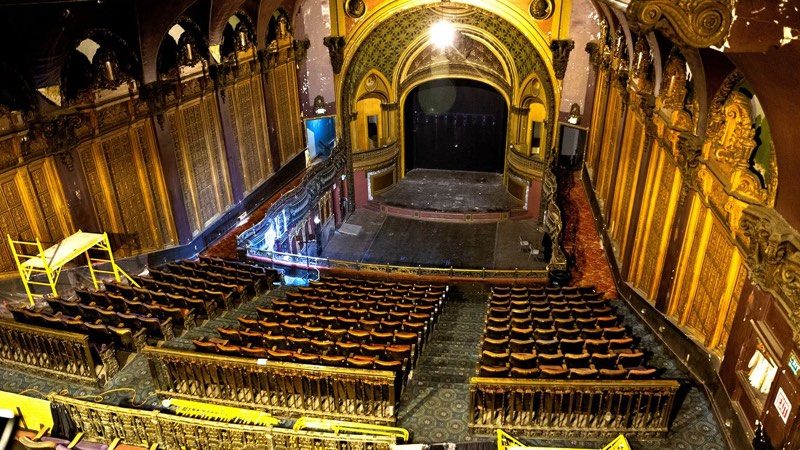
BJ Siegel, senior director of retail design at Apple, told the Los Angeles Times that Apple was inspired by the Tower Theatre's history and many of its firsts -- it was one of the first air conditioned buildings in Los Angeles.
"All of that cool technology inspires us because we are a technology company and we are bringing new technology to the place," Siegel said.
According to Siegel, while many people picture Apple retail stores as "big glass boxes," that's not true of all stores the company designs. Other similar stores include Covent Garden, the Opéra store in Paris, Apple Kurfürstendamm in Berlin, Apple Amsterdam built in the famous Hirsch building, Apple's Grand Central store in New York, and the planned Carnegie Library store in Washington, D.C.
The Tower Theatre location will be very different than other Apple retail stores in Los Angeles, says Siegel, describing it as "in the upper echelon of what Apple does."
Siegel expects some events at the upcoming store to draw hundreds of people, while other events will be planned for smaller groups. Apple will use part of the store for its Today at Apple sessions, where it provides tutorials and help with various Apple products, along with seminars and programs for children.
Apple is aiming to file plans with the city this week to gain approval for its planned renovation of the location.
Source: macrumors











