 NEWS
NEWS
Hundreds of iOS apps leaking data due to misconfigured Firebase backends, report says
 07/02/2018
 3164
3164
According to a new report from the mobile app security firm Appthority, called the Q2 2018 Enterprise Mobile Threat Report, the issue is caused by a new variant of what is dubbed the "HospitalGown vulnerability." HospitalGown, cheekily named because it deals with data "leaking through backend data stores," was first pinpointed by the Appthority Mobile Threat Team in 2017.
Now, Appthority reports that the problem is occurring when app developers opt not to require authentication for Google Firebase cloud databases, something that is not done by default when developers use the popular development tool.
Appthority found that of the 1,275 iOS apps using a Firebase database, 600 were vulnerable. Overall, more than 3,000 apps were leaking data from 2,271 misconfigured databases. And among the data leaked are 2.6 million plain text passwords and user IDs, more than 4 million Protected Health Information records, and 50,000 financial records.
"To secure data properly, developers need to specifically implement user authentication on all database tables and rows, which rarely happens in practice," Appthority writes in the report. "Moreover, it takes little effort for attackers to find open Firebase app databases and gain access to millions of private mobile data app records.
As noted by Bleeping Computer, which reported on the findings last week, Firebase is a Google product that contains backend tools for creating mobile apps. In use by many Android developers, some iOS apps also rely on the service to store and analyze data. Appthority evaluated 2.7 million iOS and Android apps to identify 28,502 mobile apps — 27,227 Android and 1,275 iOS — that stored data in Firebase backends.
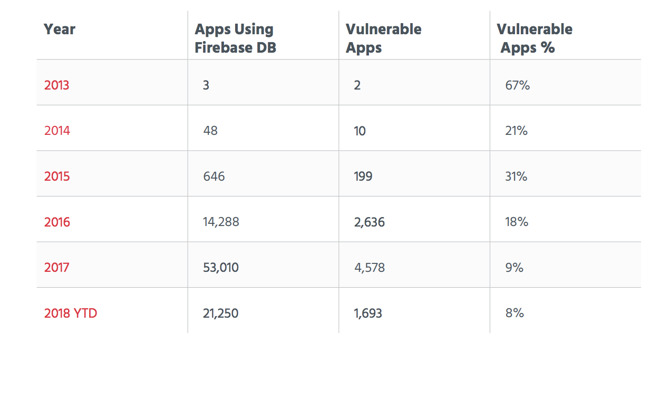
Appthority also found that as Firebase use has grown, the amount of vulnerable apps has as well. In 2017, of the 53,010 apps using Firebase DB, 4,578 (9 percent), were vulnerable.
Appthority recommends that developers protect their data more effectively.
"You'll need to perform a thorough security review of internal apps developed by third parties, in-house developed apps, and public apps available for employee productivity," Appthority writes in the report. "You may have difficulty achieving visibility into data exposed by this threat in EMM published enterprise and public apps without an automated MTD solution focused on app threats and backend vulnerabilities, such as Appthority Mobile Threat Protection."
Google has been notified of the issue and provided a list of impacted apps and servers.
Source: appleinsider










